> ## Documentation Index
> Fetch the complete documentation index at: https://lightdash-mintlify-cccf65ca.mintlify.site/llms.txt
> Use this file to discover all available pages before exploring further.
# Aggregate functions
> Built-in functions for referencing column and row totals in your table calculations.
Aggregate functions let you reference grand totals and row totals in your table calculations. Unlike [row functions](/references/table-calculation-functions/row-functions) and [pivot functions](/references/table-calculation-functions/pivot-functions) which compile to SQL window functions, aggregate functions generate separate CTEs that compute totals from the underlying data.
This means `total()` correctly handles all metric types — including `count_distinct` and `average` — by re-running the metric's native aggregation rather than naively summing grouped values.
Aggregate functions only accept **metric** field references — dimensions and other table calculations are not valid arguments. Passing a dimension (e.g. `total(${orders.customer_id})`) returns the error *"Tried to reference metric with unknown field id"*.
## total
Returns the grand total of a metric across all rows, computed from the raw data using the metric's native aggregation.
```
total(${table.metric})
```
| Parameter | Type | Description |
| :-------- | :--------------- | :---------------------------------------- |
| `metric` | metric reference | The metric to compute the grand total for |
**Example**
Calculate each row's share of total revenue:
```
${orders.total_revenue} / total(${orders.total_revenue})
```
With percent formatting applied, this gives you each row as a percentage of the overall total.
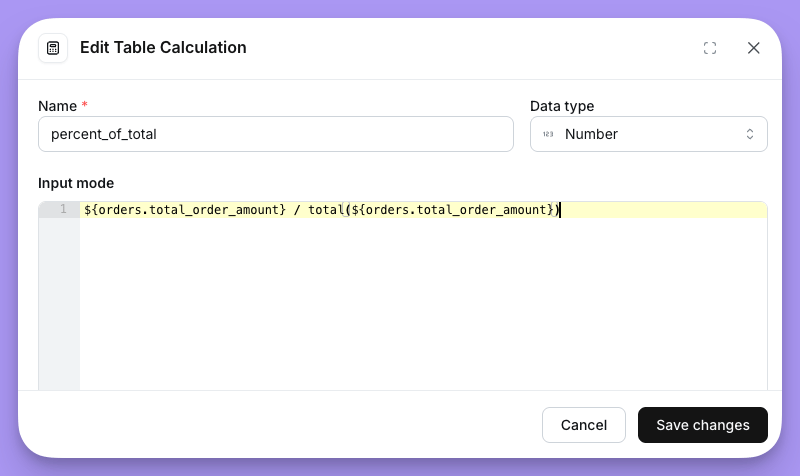 Lightdash generates a `column_totals` CTE that re-aggregates the metric from the raw data with no `GROUP BY`, producing a single grand-total value. This value is then cross-joined into the main query.
For a `sum` metric, the CTE computes `SUM(...)`. For `count_distinct`, it computes `COUNT(DISTINCT ...)`. For `average`, it computes `AVG(...)`. Each metric type uses its own native aggregation, so the total is always mathematically correct.
***
## row\_total
Returns the sum of a metric's values across all pivot columns for the current row.
```
row_total(${table.metric})
```
| Parameter | Type | Description |
| :-------- | :--------------- | :------------------------------------- |
| `metric` | metric reference | The metric to sum across pivot columns |
`row_total` is only available when your query includes a pivoted dimension. If no pivot is configured, `row_total(${table.metric})` falls back to the metric's value directly.
**Example**
In a pivot table with revenue broken out by region, calculate each region's share of the row total:
```
${orders.total_revenue} / row_total(${orders.total_revenue})
```
Lightdash generates a `row_totals` CTE that reads from the already-grouped results and computes `SUM(metric)` grouped by the non-pivot dimensions. This gives one total per row, which is then joined back into the main query.
Unlike `total()`, `row_total()` always uses `SUM` regardless of the metric type, since it's summing pre-aggregated values across the pivot columns within each row.
Lightdash generates a `column_totals` CTE that re-aggregates the metric from the raw data with no `GROUP BY`, producing a single grand-total value. This value is then cross-joined into the main query.
For a `sum` metric, the CTE computes `SUM(...)`. For `count_distinct`, it computes `COUNT(DISTINCT ...)`. For `average`, it computes `AVG(...)`. Each metric type uses its own native aggregation, so the total is always mathematically correct.
***
## row\_total
Returns the sum of a metric's values across all pivot columns for the current row.
```
row_total(${table.metric})
```
| Parameter | Type | Description |
| :-------- | :--------------- | :------------------------------------- |
| `metric` | metric reference | The metric to sum across pivot columns |
`row_total` is only available when your query includes a pivoted dimension. If no pivot is configured, `row_total(${table.metric})` falls back to the metric's value directly.
**Example**
In a pivot table with revenue broken out by region, calculate each region's share of the row total:
```
${orders.total_revenue} / row_total(${orders.total_revenue})
```
Lightdash generates a `row_totals` CTE that reads from the already-grouped results and computes `SUM(metric)` grouped by the non-pivot dimensions. This gives one total per row, which is then joined back into the main query.
Unlike `total()`, `row_total()` always uses `SUM` regardless of the metric type, since it's summing pre-aggregated values across the pivot columns within each row.