> ## Documentation Index
> Fetch the complete documentation index at: https://lightdash-mintlify-cccf65ca.mintlify.site/llms.txt
> Use this file to discover all available pages before exploring further.
# Monitoring and debugging pre-aggregates
> Track materialization status, understand why queries miss pre-aggregates, and manage refreshes.
You can monitor pre-aggregates from **Project Settings > Pre-aggregates**. This section has two tabs: **Materializations** for tracking status and **Analytics** for query hit/miss statistics.
## Materialization status
The **Materializations** tab shows all your pre-aggregates and their current state.
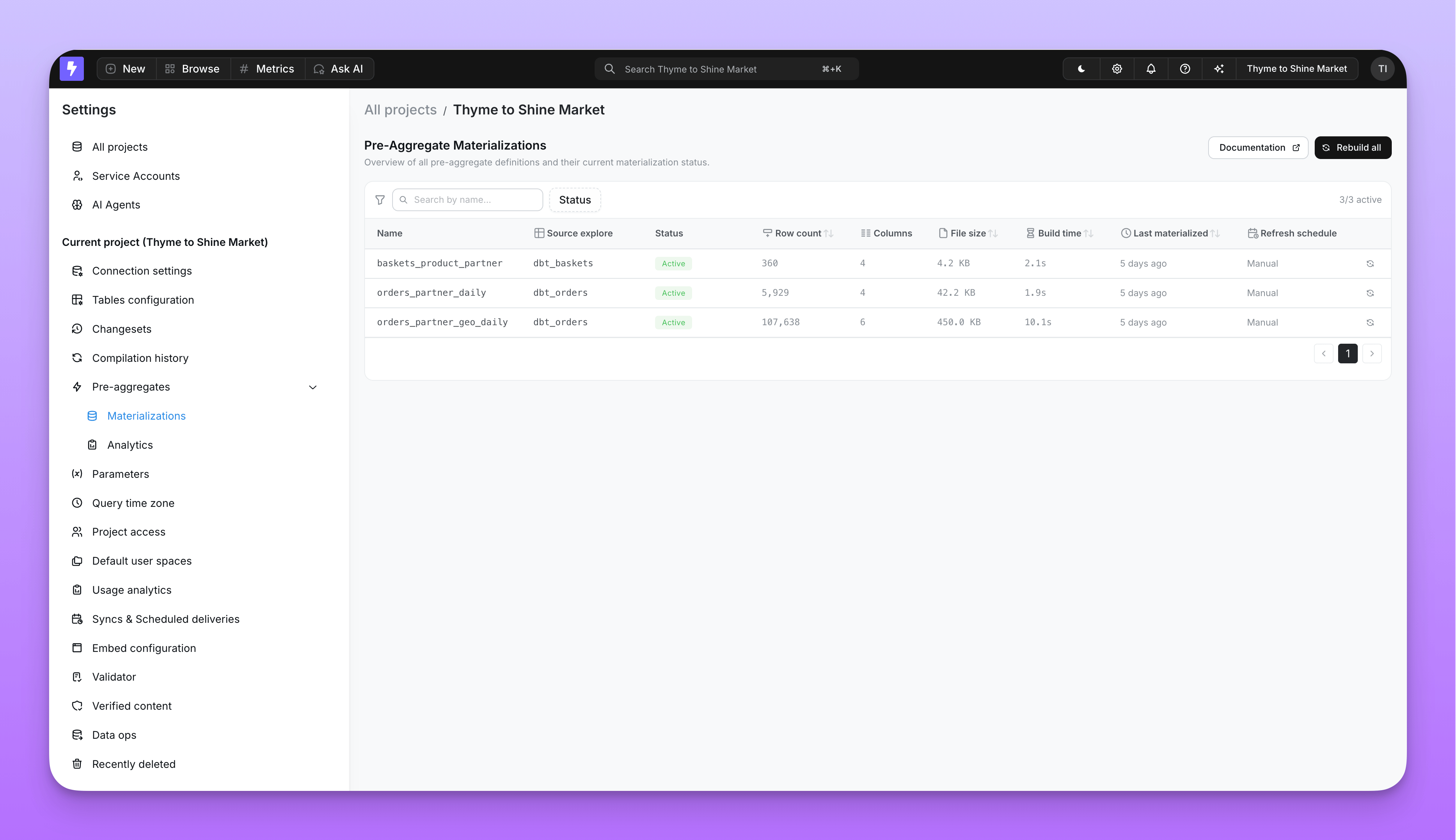 Each pre-aggregate has a materialization lifecycle:
| Status | Meaning |
| --------------- | -------------------------------------------------------------------------------------------------------------------------------- |
| **Active** | The materialization is live and serving matching queries. Only one materialization can be active per pre-aggregate at a time. |
| **In progress** | A new materialization is being built. The previous active materialization continues serving queries until the new one completes. |
| **Failed** | The materialization encountered an error. Check the error message for details. |
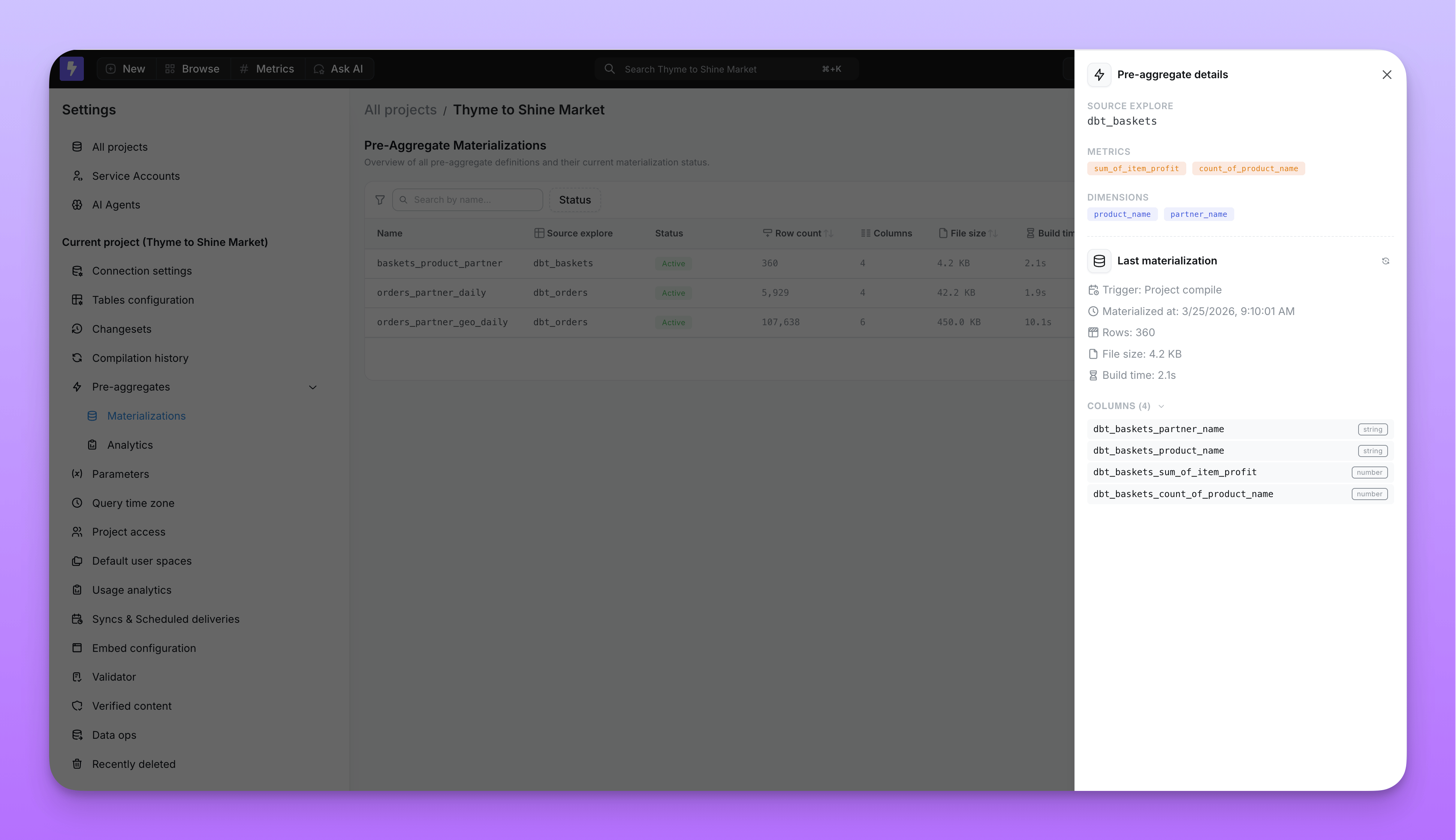
You can click on any pre-aggregate to see its full details, including row count, file size, and duration.
Each pre-aggregate has a materialization lifecycle:
| Status | Meaning |
| --------------- | -------------------------------------------------------------------------------------------------------------------------------- |
| **Active** | The materialization is live and serving matching queries. Only one materialization can be active per pre-aggregate at a time. |
| **In progress** | A new materialization is being built. The previous active materialization continues serving queries until the new one completes. |
| **Failed** | The materialization encountered an error. Check the error message for details. |
You can click on any pre-aggregate to see its full details, including row count, file size, and duration.
 ## Hit and miss statistics
The **Analytics** tab tracks how often queries hit or miss pre-aggregates on a daily basis.
## Hit and miss statistics
The **Analytics** tab tracks how often queries hit or miss pre-aggregates on a daily basis.
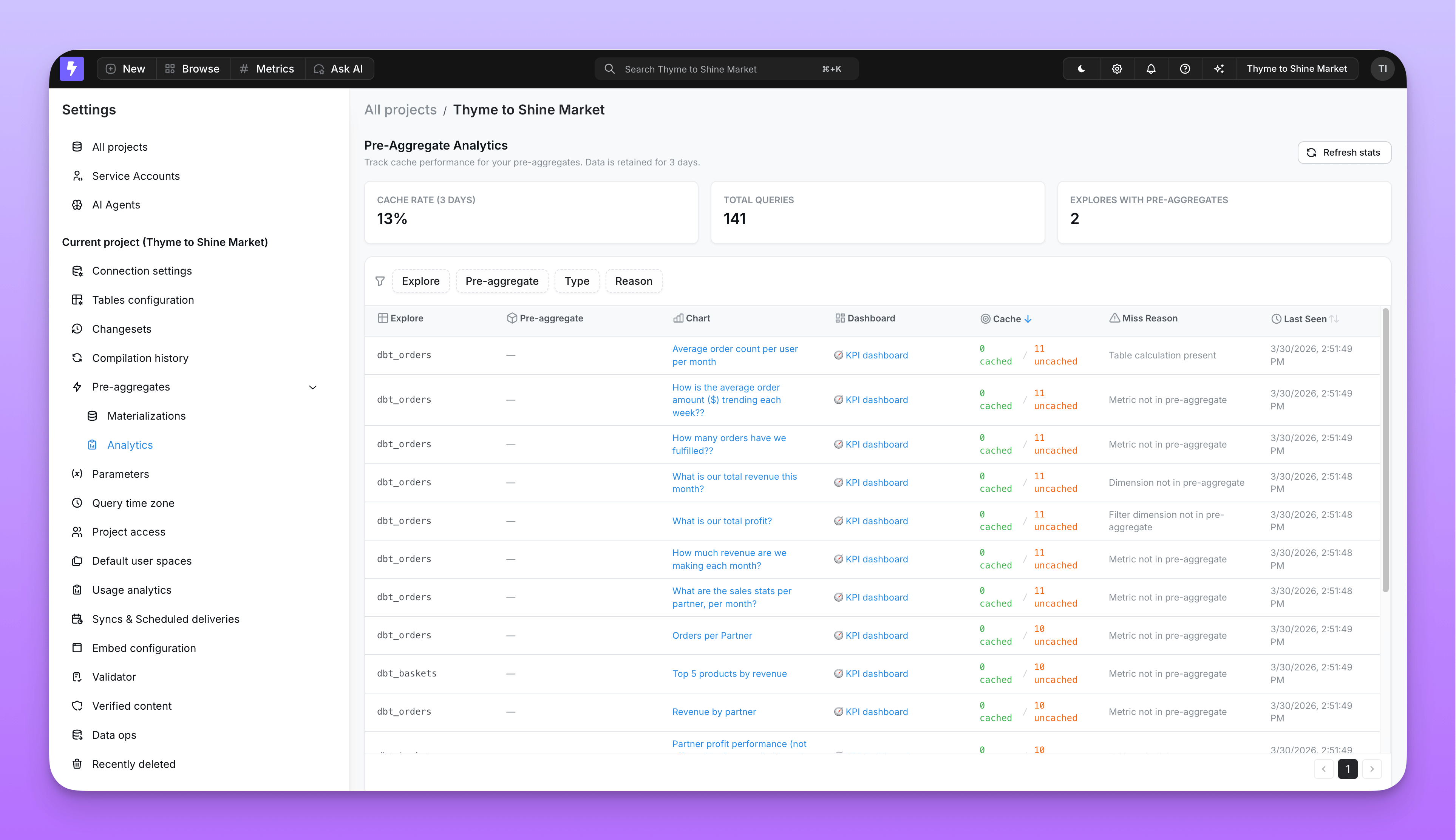 You can break down the statistics by:
* **Explore name** — which explores are benefiting from pre-aggregates
* **Query context** — whether the query came from a chart, dashboard, or the explorer
* **Chart or dashboard** — which specific saved content is hitting or missing
Use these stats to identify opportunities for new pre-aggregates or to tune existing ones.
## Why a query misses a pre-aggregate
When a query doesn't match any pre-aggregate, Lightdash records the specific reason. Understanding these reasons helps you decide whether to adjust your pre-aggregate definition or accept the warehouse query.
| Miss reason | What it means | How to fix it |
| ----------------------------------------- | --------------------------------------------------------------------------------------------------------------------------- | ----------------------------------------------------------------------------------------------------------------------------------------------------------------------------------------------------- |
| **No pre-aggregates defined** | The explore has no pre-aggregates configured. | Add a `pre_aggregates` block to your dbt model. |
| **Dimension not in pre-aggregate** | The query includes a dimension not covered by any pre-aggregate. | Add the missing dimension to your pre-aggregate's `dimensions` list. |
| **Metric not in pre-aggregate** | The query includes a metric not covered by any pre-aggregate. | Add the missing metric to your pre-aggregate's `metrics` list. |
| **Filter dimension not in pre-aggregate** | A filter references a dimension not in the pre-aggregate. | Add the filter dimension to the `dimensions` list — even if it's only used for filtering, not grouping. |
| **Pre-aggregate filter not satisfied** | The pre-aggregate definition includes a static filter, but the query is missing it or uses a broader/incompatible filter. | Add the matching filter to the query, narrow the query filter, or create another pre-aggregate for that query pattern. |
| **Non-additive metric** | The query includes a metric type that can't be re-aggregated (for example, `count_distinct` or `median`). | This metric type is not supported. See [supported metric types](/references/pre-aggregates/overview#supported-metric-types). |
| **Custom SQL metric** | The query includes a non-reaggregatable custom SQL metric, such as a `number` metric. | Use a supported metric type, or let the query run against the warehouse. |
| **Granularity too fine** | The query requests a finer time granularity than the pre-aggregate provides (for example, `hour` on a `day` pre-aggregate). | Either lower the pre-aggregate's granularity or accept the warehouse query for this use case. |
| **Custom dimension present** | The query uses a custom SQL dimension. | Custom SQL dimensions created in the UI are not supported. [Write them back](/guides/developer/dbt-write-back#write-back-dimensions-automatically-replacing-custom-dimensions) to the semantic layer. |
| **Custom metric present** | The query uses a custom metric. | Custom metrics defined in the Explorer are not supported. [Write them back](/guides/developer/dbt-write-back#write-back-dimensions-automatically-replacing-custom-dimensions) to the semantic layer. |
| **Table calculation present** | The query includes a raw SQL table calculation. | Use a formula table calculation instead, or let the query run against the warehouse. |
| **User bypass** | The user explicitly bypassed the pre-aggregate cache. | No action needed — this is intentional. |
## Dashboard pre-aggregate view
You can also monitor and manage pre-aggregates directly from any dashboard. Open the dashboard menu to access pre-aggregate options.
You can break down the statistics by:
* **Explore name** — which explores are benefiting from pre-aggregates
* **Query context** — whether the query came from a chart, dashboard, or the explorer
* **Chart or dashboard** — which specific saved content is hitting or missing
Use these stats to identify opportunities for new pre-aggregates or to tune existing ones.
## Why a query misses a pre-aggregate
When a query doesn't match any pre-aggregate, Lightdash records the specific reason. Understanding these reasons helps you decide whether to adjust your pre-aggregate definition or accept the warehouse query.
| Miss reason | What it means | How to fix it |
| ----------------------------------------- | --------------------------------------------------------------------------------------------------------------------------- | ----------------------------------------------------------------------------------------------------------------------------------------------------------------------------------------------------- |
| **No pre-aggregates defined** | The explore has no pre-aggregates configured. | Add a `pre_aggregates` block to your dbt model. |
| **Dimension not in pre-aggregate** | The query includes a dimension not covered by any pre-aggregate. | Add the missing dimension to your pre-aggregate's `dimensions` list. |
| **Metric not in pre-aggregate** | The query includes a metric not covered by any pre-aggregate. | Add the missing metric to your pre-aggregate's `metrics` list. |
| **Filter dimension not in pre-aggregate** | A filter references a dimension not in the pre-aggregate. | Add the filter dimension to the `dimensions` list — even if it's only used for filtering, not grouping. |
| **Pre-aggregate filter not satisfied** | The pre-aggregate definition includes a static filter, but the query is missing it or uses a broader/incompatible filter. | Add the matching filter to the query, narrow the query filter, or create another pre-aggregate for that query pattern. |
| **Non-additive metric** | The query includes a metric type that can't be re-aggregated (for example, `count_distinct` or `median`). | This metric type is not supported. See [supported metric types](/references/pre-aggregates/overview#supported-metric-types). |
| **Custom SQL metric** | The query includes a non-reaggregatable custom SQL metric, such as a `number` metric. | Use a supported metric type, or let the query run against the warehouse. |
| **Granularity too fine** | The query requests a finer time granularity than the pre-aggregate provides (for example, `hour` on a `day` pre-aggregate). | Either lower the pre-aggregate's granularity or accept the warehouse query for this use case. |
| **Custom dimension present** | The query uses a custom SQL dimension. | Custom SQL dimensions created in the UI are not supported. [Write them back](/guides/developer/dbt-write-back#write-back-dimensions-automatically-replacing-custom-dimensions) to the semantic layer. |
| **Custom metric present** | The query uses a custom metric. | Custom metrics defined in the Explorer are not supported. [Write them back](/guides/developer/dbt-write-back#write-back-dimensions-automatically-replacing-custom-dimensions) to the semantic layer. |
| **Table calculation present** | The query includes a raw SQL table calculation. | Use a formula table calculation instead, or let the query run against the warehouse. |
| **User bypass** | The user explicitly bypassed the pre-aggregate cache. | No action needed — this is intentional. |
## Dashboard pre-aggregate view
You can also monitor and manage pre-aggregates directly from any dashboard. Open the dashboard menu to access pre-aggregate options.
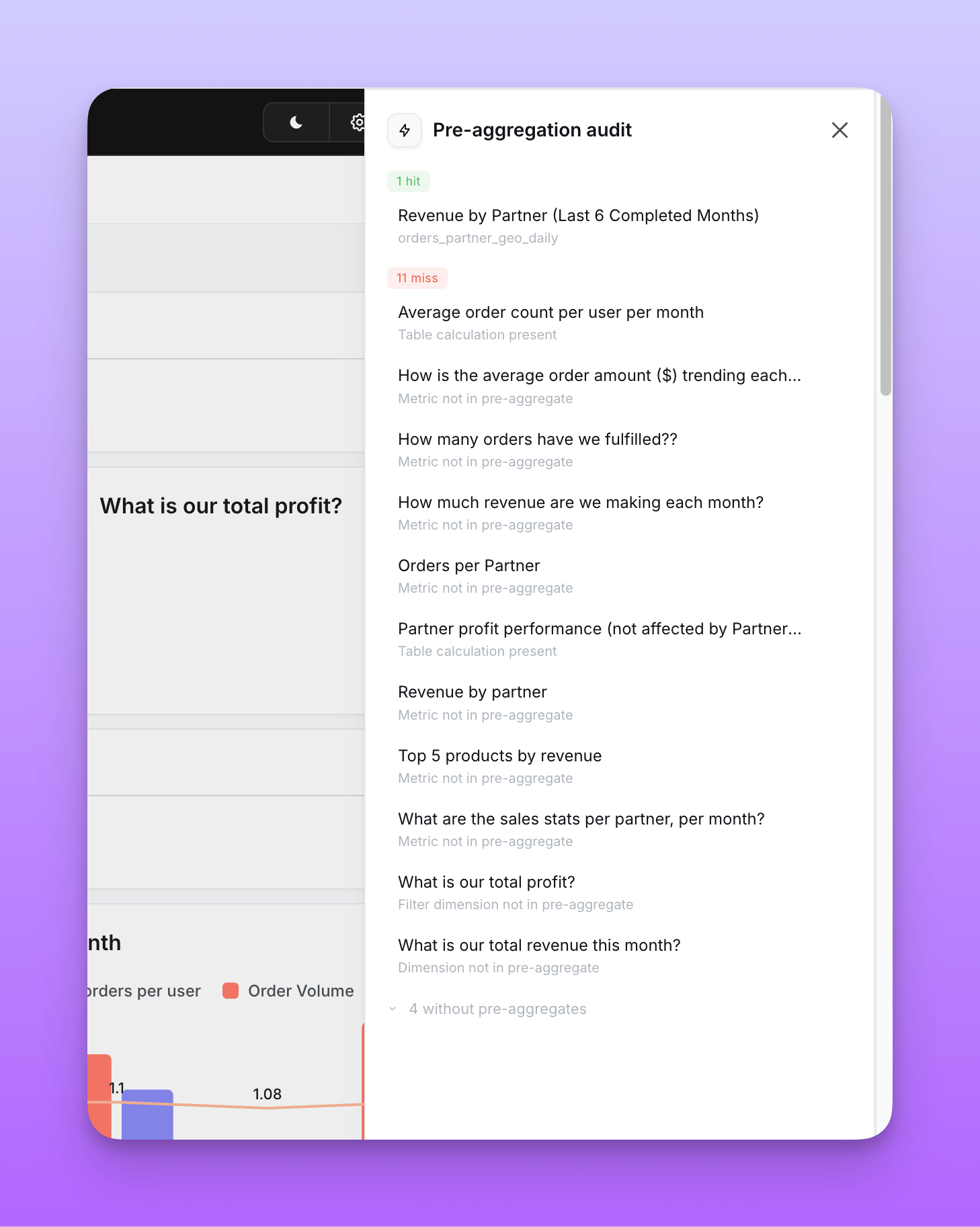
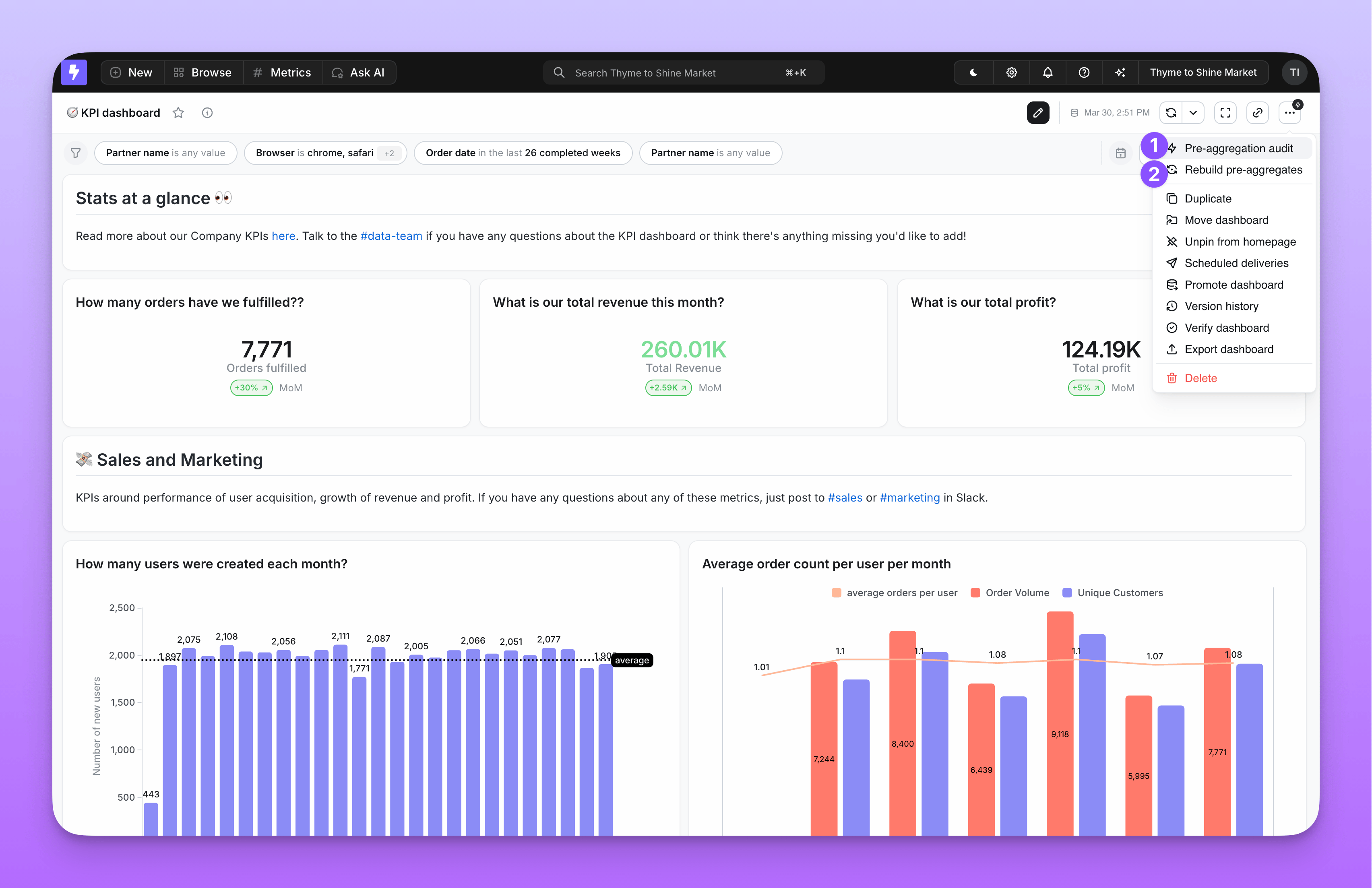 1. **Pre-aggregation audit** — Shows which tiles in the dashboard are hitting or missing pre-aggregates, and why. Available to editors, developers, and admins.
2. **Rebuild pre-aggregates** — Triggers a manual re-materialization for the pre-aggregates used by this dashboard. Available to developers and admins only.
1. **Pre-aggregation audit** — Shows which tiles in the dashboard are hitting or missing pre-aggregates, and why. Available to editors, developers, and admins.
2. **Rebuild pre-aggregates** — Triggers a manual re-materialization for the pre-aggregates used by this dashboard. Available to developers and admins only.
 The same audit data is available from the terminal via [`lightdash pre-aggregate-audit`](/references/pre-aggregates/cli-audit), which is useful for scripting, project-wide sweeps, and CI gates.