> ## Documentation Index
> Fetch the complete documentation index at: https://lightdash-mintlify-cccf65ca.mintlify.site/llms.txt
> Use this file to discover all available pages before exploring further.
# Joins reference
> Joins let you connect different models to each other so that you can explore more than one model at the same time in Lightdash and see how different parts of your data relate to each other.
**Performance Best Practice:** For optimal query performance, we recommend using wide tables wherever possible and minimising joins in the BI layer. While we offer advanced features like fanout protection to help with complex relationships, handling data transformations and complex logic directly in your SQL models will generally yield better performance than relying heavily on joins at query time. Consider pre-joining related data during your data modeling process rather than joining tables on-the-fly in dashboards and reports.
## Adding joins in your models
Joins are defined at the same level as the model parameters in your YAML file.
```yaml theme={null}
models:
- name: accounts
meta:
primary_key: id
joins:
- join: deals
type: left
sql_on: ${accounts.id} = ${deals.account_id}
fields: [unique_deals, new_deals, won_deals, lost_deals, stage]
relationship: one-to-many
```
```yaml theme={null}
models:
- name: accounts
config:
meta:
primary_key: id
joins:
- join: deals
type: left
sql_on: ${accounts.id} = ${deals.account_id}
fields: [unique_deals, new_deals, won_deals, lost_deals, stage]
relationship: one-to-many
```
```yaml theme={null}
type: model
name: accounts
primary_key: id
joins:
- join: deals
type: left
sql_on: ${accounts.id} = ${deals.account_id}
fields: [unique_deals, new_deals, won_deals, lost_deals, stage]
relationship: one-to-many
```
When you open Lightdash, the dimensions and metrics from your joined model will appear below the ones in your selected model.
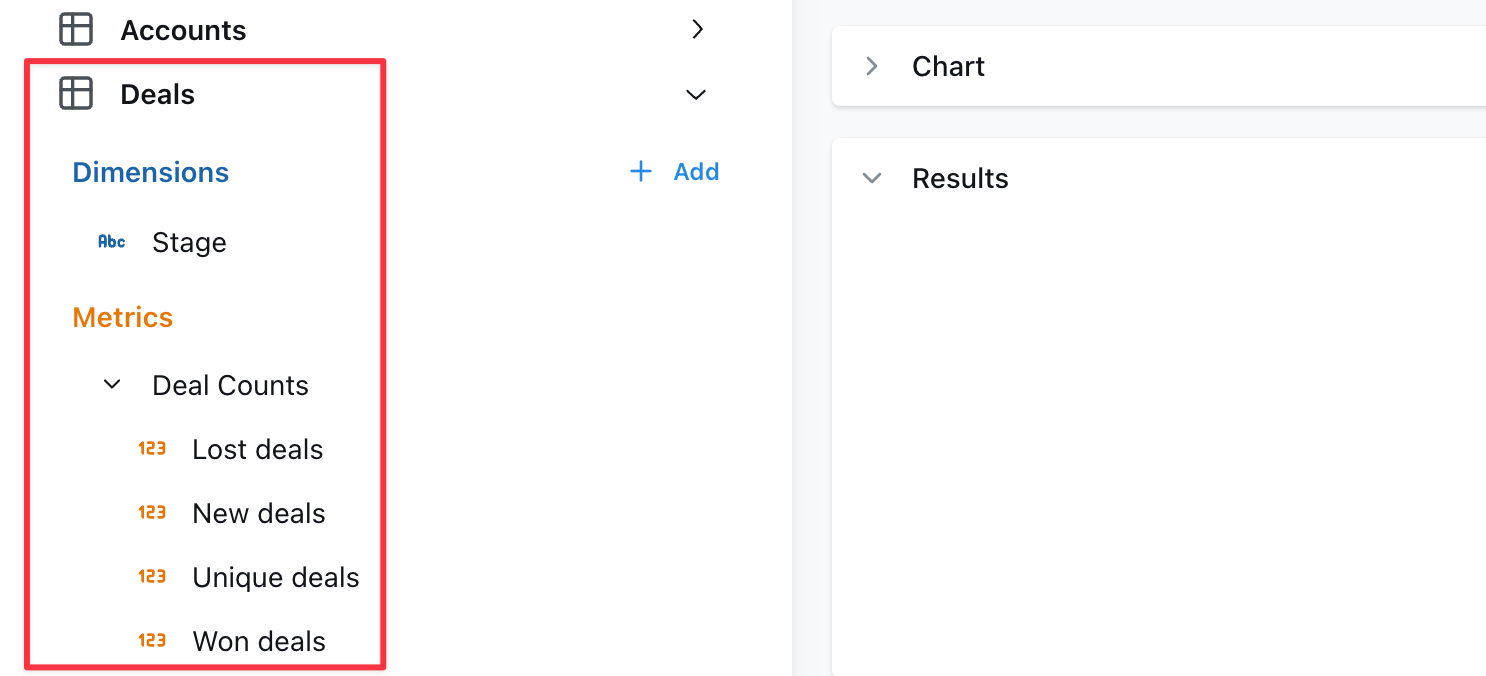 * Omit `fields` to include all metrics and dimensions defined in the joined table.
* When joined fields reference other fields, those other fields must be included.
* The `sql_on` statement can include references to [user attributes](/references/workspace/user-attributes) for row-level filtering.
## Rename a joined model
When joining tables, you may want to rename for readability. This can be done with the `label` tag, for example on the `messages` model it makes sense to rename the joined `users` table as "Sender":
```yaml theme={null}
models:
- name: messages
meta:
joins:
- join: users
label: Sender
sql_on: ${messages.sent_by} = ${users.user_id}
```
```yaml theme={null}
models:
- name: messages
config:
meta:
joins:
- join: users
label: Sender
sql_on: ${messages.sent_by} = ${users.user_id}
```
```yaml theme={null}
type: model
name: messages
joins:
- join: users
label: Sender
sql_on: ${messages.sent_by} = ${users.user_id}
```
You can also override the description of the joined table by providing a `description` field:
```yaml theme={null}
models:
- name: messages
meta:
joins:
- join: users
label: Sender
description: User who sent the message
sql_on: ${messages.sent_by} = ${users.user_id}
```
```yaml theme={null}
models:
- name: messages
config:
meta:
joins:
- join: users
label: Sender
description: User who sent the message
sql_on: ${messages.sent_by} = ${users.user_id}
```
```yaml theme={null}
type: model
name: messages
joins:
- join: users
label: Sender
description: User who sent the message
sql_on: ${messages.sent_by} = ${users.user_id}
```
## Join the same table multiple times
If you need to join a table multiple times, you can use an `alias` to distinguish between the different tables. A common use case is joining a user table multiple times to another table depending on the type of user. For example this `messages` model has both a sender and a recipient:
```yaml theme={null}
models:
- name: messages
meta:
joins:
- join: users
alias: sender
sql_on: ${messages.sent_by} = ${sender.user_id}
- join: users
alias: recipient
sql_on: ${messages.sent_to} = ${recipient.user_id}
```
```yaml theme={null}
models:
- name: messages
config:
meta:
joins:
- join: users
alias: sender
sql_on: ${messages.sent_by} = ${sender.user_id}
- join: users
alias: recipient
sql_on: ${messages.sent_to} = ${recipient.user_id}
```
```yaml theme={null}
type: model
name: messages
joins:
- join: users
alias: sender
sql_on: ${messages.sent_by} = ${sender.user_id}
- join: users
alias: recipient
sql_on: ${messages.sent_to} = ${recipient.user_id}
```
We recommend using `alias` values that are all lowercase and do not include spaces to avoid unexpected issues.
Note the following important differences when using alias in joins:
1. You must reference the fields in the model using the new alias. Notice that the joins above use `${sender.user_id}` rather than `${users.user_id}`.
2. Because of the above, any fields in the base model or joined model that reference any field `${users.*}` will fail to compile. Be careful of aliasing tables that are used in the base model.
3. Joined models are automatically relabelled with the alias but you may also customise this using the `label:` field as above.
## Specify your join type
If you want to specify the type of join to be used in your SQL query, use the `type` field in your YAML configuration file. Set its value to one of the following: `inner`, `left`, `right`, or `full`. This will determine how the tables are joined in your query, aligning with SQL's inner join, left outer join, right outer join, or full outer join respectively.
Here's an example of how to specify a join type:
```yaml theme={null}
models:
- name: messages
meta:
joins:
- join: users
type: inner
sql_on: ${messages.sent_by} = ${users.user_id}
```
```yaml theme={null}
models:
- name: messages
config:
meta:
joins:
- join: users
type: inner
sql_on: ${messages.sent_by} = ${users.user_id}
```
```yaml theme={null}
type: model
name: messages
joins:
- join: users
type: inner
sql_on: ${messages.sent_by} = ${users.user_id}
```
By default, if no `type` is specified, Lightdash will use a `left join`.
Here's a table to help you understand what each join type means and how it translates to SQL:
| Join Type | Generated SQL | Description |
| :-------------- | :--------------- | :-------------------------------------------------------------------------------------------------------------------------------------------------------------- |
| [inner](#inner) | inner join | Returns rows that have matching values in both tables. |
| [left](#left) | left outer join | Returns all rows from the left table, and the matching rows from the right table. Non-matching rows will have NULL for right table's columns. |
| [right](#right) | right outer join | Returns all rows from the right table, and the matching rows from the left table. Non-matching rows will have NULL for left table's columns. |
| [full](#full) | full outer join | Returns all rows when there is a match in either the left or right table records. Non-matching rows will have NULL for columns of the table that lacks a match. |
### inner
An inner join returns rows that have matching values in both tables. For example, if you have a `users` table and a `subscriptions` table, an inner join would return only the users who have a subscription.
Here's an example of how to specify an inner join:
```yaml theme={null}
models:
- name: users
meta:
joins:
- join: subscriptions
sql_on: ${users.user_id} = ${subscriptions.user_id}
type: inner
```
```yaml theme={null}
models:
- name: users
config:
meta:
joins:
- join: subscriptions
sql_on: ${users.user_id} = ${subscriptions.user_id}
type: inner
```
```yaml theme={null}
type: model
name: users
joins:
- join: subscriptions
sql_on: ${users.user_id} = ${subscriptions.user_id}
type: inner
```
### left
A left join returns all rows from the left table (i.e. the model where you're adding the `join` to), and the matching rows from the right table (i.e. the model you've specified in `- join:`). Non-matching rows will have `NULL` for right table's columns. For example, if you have a `users` table and a `subscriptions` table, a left join would return all users, and the subscription information for users who have a subscription.
Here's an example of how to specify a left join:
```yaml theme={null}
models:
- name: users
meta:
joins:
- join: subscriptions
sql_on: ${users.user_id} = ${subscriptions.user_id}
type: left # you can omit this, as left is the default
```
```yaml theme={null}
models:
- name: users
config:
meta:
joins:
- join: subscriptions
sql_on: ${users.user_id} = ${subscriptions.user_id}
type: left # you can omit this, as left is the default
```
```yaml theme={null}
type: model
name: users
joins:
- join: subscriptions
sql_on: ${users.user_id} = ${subscriptions.user_id}
type: left # you can omit this, as left is the default
```
### right
A right join returns all rows from the right table (i.e. the model you've specified in `- join: `), and the matching rows from the left table (i.e. the model where you're adding the `join` to). Non-matching rows will have `NULL` for left table's columns. For example, if you have a `users` table and a `subscriptions` table, a right join would return all subscriptions, and the user information for users who have a subscription.
Here's an example of how to specify a right join:
```yaml theme={null}
models:
- name: users
meta:
joins:
- join: subscriptions
sql_on: ${users.user_id} = ${subscriptions.user_id}
type: right
```
```yaml theme={null}
models:
- name: users
config:
meta:
joins:
- join: subscriptions
sql_on: ${users.user_id} = ${subscriptions.user_id}
type: right
```
```yaml theme={null}
type: model
name: users
joins:
- join: subscriptions
sql_on: ${users.user_id} = ${subscriptions.user_id}
type: right
```
### full
A full join returns all rows when there is a match in either the left or right table records. Non-matching rows will have `NULL` for columns of the table that lacks a match. For example, if you have a `users` table and a `subscriptions` table, a full join would return all users and all subscriptions, and the subscription information for users who have a subscription.
## Defining join relationships
You can define the relationship between tables in your joins to help Lightdash show warnings and generate the appropriate SQL. This is especially useful for preventing SQL fanouts issues described in the [SQL fanouts](#sql-fanouts) section.
To define a relationship, add the `relationship` field to your join configuration.
```yaml theme={null}
models:
- name: users
meta:
primary_key: user_id
joins:
- join: orders
sql_on: ${users.user_id} = ${orders.user_id}
relationship: one-to-many
```
```yaml theme={null}
models:
- name: users
config:
meta:
primary_key: user_id
joins:
- join: orders
sql_on: ${users.user_id} = ${orders.user_id}
relationship: one-to-many
```
```yaml theme={null}
type: model
name: users
primary_key: user_id
joins:
- join: orders
sql_on: ${users.user_id} = ${orders.user_id}
relationship: one-to-many
```
Make sure that you consider the direction of the join when defining the relationship. If you incorreclty define the join relationship, your will be affected by fanouts.
##### The following join relationships are supported:
* `one-to-many` - Starting table has 1 record, joined table has many matches
* `many-to-one` - Starting table has many records, joined table has 1 match
* `one-to-one` - Starting table has 1 record, joined table has 1 match
* `many-to-many` - Multiple records in the starting table match multiple records in the joined table
#### Step 1: Identify your starting table
Which table are you joining FROM? Direction matters: `Accounts` joining to `Users` (one-to-many) is completely different from users joining to accounts (many-to-one), even though it's the same data.
#### Step 2: Count the expected matches and name the join relationship
For any record in your starting table, ask: "How many matching records will I find in the table I'm joining to and vice versa?" Refer to the supported join relationships listed above.
The examples below detail some more complex join relationships:
##### Chained Join Example
Don't try to figure out `Accounts` → `Users` → `Tracks` all at once. Analyze each join separately:
* First: `Accounts` → `Users` (one-to-many)
* Then: `Users` → `Tracks` (one-to-many)
* Overall result: `Accounts` → `Tracks` (one-to-many)
The `accounts.yml` file will look like this:
```yaml theme={null}
models:
- name: accounts
meta:
primary_key: account_id
description: List of all customer and prospective customer Accounts pulled from our CRM
joins:
- join: users
relationship: one-to-many
sql_on: ${accounts.account_id} = ${users.account_id}
type: left
- join: tracks
relationship: one-to-many
sql_on: ${users.user_id} = ${tracks.user_id}
type: left
```
```yaml theme={null}
models:
- name: accounts
config:
meta:
primary_key: account_id
description: List of all customer and prospective customer Accounts pulled from our CRM
joins:
- join: users
relationship: one-to-many
sql_on: ${accounts.account_id} = ${users.account_id}
type: left
- join: tracks
relationship: one-to-many
sql_on: ${users.user_id} = ${tracks.user_id}
type: left
```
```yaml theme={null}
type: model
name: accounts
primary_key: account_id
description: List of all customer and prospective customer Accounts pulled from our CRM
joins:
- join: users
relationship: one-to-many
sql_on: ${accounts.account_id} = ${users.account_id}
type: left
- join: tracks
relationship: one-to-many
sql_on: ${users.user_id} = ${tracks.user_id}
type: left
```
The above setup will consider both `Accounts` and `Users` as being susceptible to fanouts and these would be handled accordingly. When you chain two one-to-many relationships, you get a one-to-many relationship from your starting table to your final table (`Accounts` can have many `Tracks`).
Note that if I wanted to join `Users` and `Accounts` onto the `Tracks`, where `Tracks` is the starting model, the direction of the relationship would look different:
The `tracks.yml` model would look like this:
```yaml theme={null}
models:
- name: tracks
meta:
primary_key: account_id
description: List of all customer and prospective customer Accounts pulled from our CRM
joins:
- join: users
relationship: many-to-one
sql_on: ${users.user_id} = ${tracks.user_id}
type: right
- join: accounts
relationship: many-to-one
sql_on: ${users.account_id} = ${accounts.account_id}
type: right
```
```yaml theme={null}
models:
- name: tracks
config:
meta:
primary_key: account_id
description: List of all customer and prospective customer Accounts pulled from our CRM
joins:
- join: users
relationship: many-to-one
sql_on: ${users.user_id} = ${tracks.user_id}
type: right
- join: accounts
relationship: many-to-one
sql_on: ${users.account_id} = ${accounts.account_id}
type: right
```
```yaml theme={null}
type: model
name: tracks
primary_key: account_id
description: List of all customer and prospective customer Accounts pulled from our CRM
joins:
- join: users
relationship: many-to-one
sql_on: ${users.user_id} = ${tracks.user_id}
type: right
- join: accounts
relationship: many-to-one
sql_on: ${users.account_id} = ${accounts.account_id}
type: right
```
##### Complex Join Example
We want to see all `Accounts` and all `Deals`, but we only want to see `Users` (and their associated event `Tracks`) for `Accounts` that have at least one `Deal` in the "Won" stage.
This join example is covered in our Demo site [here](https://demo.lightdash.com/projects/d496d901-a76d-4916-9eae-b81bc7337013/dashboards/471bc4ac-ef14-4efc-b972-7f8f0be18d18/view).
This requires a complex join that involves 4 different tables.
* First: `Accounts` → `Deals` (one-to-many)
* Next: `Accounts` and `Deals` → `Users` (many-to-many) - each `Account`+ `Deal` combination can be associated with many `Users` and each user can be associated with multiple `Deals`.
* Then: `Users` → `Tracks` (one-to-many)
A normal SQL join that does not account for fanouts would look like this:
```sql theme={null}
select
*
from
accounts
left join deals on
accounts.account_id = deals.account_id
left join users on
accounts.account_id = users.account_id and deals.stage ='Won'
left join tracks on
users.user_id = tracks.user_id
```
And the `accounts.yml` would look like this:
```yaml theme={null}
models:
- name: accounts
meta:
primary_key: account_id
description: List of all customer and prospective customer Accounts pulled from our CRM
joins:
- join: deals
relationship: one-to-many
sql_on: ${accounts.account_id} = ${deals.account_id}
type: left
- join: users
relationship: many-to-many
sql_on: ${accounts.account_id} = ${users.account_id} and ${deals.stage} = 'Won'
type: left
- join: tracks
relationship: one-to-many
sql_on: ${users.user_id} = ${tracks.user_id}
type: left
```
```yaml theme={null}
models:
- name: accounts
config:
meta:
primary_key: account_id
description: List of all customer and prospective customer Accounts pulled from our CRM
joins:
- join: deals
relationship: one-to-many
sql_on: ${accounts.account_id} = ${deals.account_id}
type: left
- join: users
relationship: many-to-many
sql_on: ${accounts.account_id} = ${users.account_id} and ${deals.stage} = 'Won'
type: left
- join: tracks
relationship: one-to-many
sql_on: ${users.user_id} = ${tracks.user_id}
type: left
```
```yaml theme={null}
type: model
name: accounts
primary_key: account_id
description: List of all customer and prospective customer Accounts pulled from our CRM
joins:
- join: deals
relationship: one-to-many
sql_on: ${accounts.account_id} = ${deals.account_id}
type: left
- join: users
relationship: many-to-many
sql_on: ${accounts.account_id} = ${users.account_id} and ${deals.stage} = 'Won'
type: left
- join: tracks
relationship: one-to-many
sql_on: ${users.user_id} = ${tracks.user_id}
type: left
```
In this case, the fanout protection logic will consider metrics from all models to be susceptible to fanouts.
#### Step 3: Check for conditional joins
Look for any AND conditions in your join logic (like and `${deals.stage} = 'Won'`). These can change your relationship from what you'd expect - a typical one-to-many might become many-to-many when you add conditions.
#### Step 4: Validate with sample data
Pick one record from your starting table and manually trace through the joins. Count how many final records you get - this helps catch relationship mistakes before they cause problems.
## Always join a table
If you need a table to always be joined, you can set the `always` field to `true`.
```yaml theme={null}
models:
- name: messages
meta:
joins:
- join: users
sql_on: ${messages.sent_by} = ${users.user_id}
always: true
```
```yaml theme={null}
models:
- name: messages
config:
meta:
joins:
- join: users
sql_on: ${messages.sent_by} = ${users.user_id}
always: true
```
```yaml theme={null}
type: model
name: messages
joins:
- join: users
sql_on: ${messages.sent_by} = ${users.user_id}
always: true
```
This will make sure that even when you don't select any of the fields from the joined table it will still be joined in the query.
## Only select a subset of fields from a join
Use the `fields` tag to select a subset of fields from a join. This is useful if you want to join a model but only a few of its fields are useful in the joined context. For example this `messages` model only needs the `name` and`email` fields from the `users` model. Note we must also include the `user_id` field since it's needed for the join.
```yaml theme={null}
models:
- name: messages
meta:
joins:
- join: users
sql_on: ${messages.sent_by} = ${users.user_id}
fields: [user_id, email, name]
```
```yaml theme={null}
models:
- name: messages
config:
meta:
joins:
- join: users
sql_on: ${messages.sent_by} = ${users.user_id}
fields: [user_id, email, name]
```
```yaml theme={null}
type: model
name: messages
joins:
- join: users
sql_on: ${messages.sent_by} = ${users.user_id}
fields: [user_id, email, name]
```
## Using joined dimensions or metrics in your YAML
Once you've joined a model, you can reference the metrics and dimensions from your joined model in your configurations.
For example, I can filter one of my metrics using a dimension from my joined model, like this:
```yaml theme={null}
models:
- name: users
meta:
joins:
- join: web_sessions
sql_on: ${web_sessions.user_id} = ${users.user_id}
- join: subscriptions
sql_on: ${subscriptions.user_id} = ${users.user_id} AND ${subscriptions.is_active}
columns:
- name: user_id
meta:
metrics:
num_unique_premium_user_ids:
type: count_distinct
filters:
- subscriptions.plan: premium
```
```yaml theme={null}
models:
- name: users
config:
meta:
joins:
- join: web_sessions
sql_on: ${web_sessions.user_id} = ${users.user_id}
- join: subscriptions
sql_on: ${subscriptions.user_id} = ${users.user_id} AND ${subscriptions.is_active}
columns:
- name: user_id
config:
meta:
metrics:
num_unique_premium_user_ids:
type: count_distinct
filters:
- subscriptions.plan: premium
```
```yaml theme={null}
type: model
name: users
joins:
- join: web_sessions
sql_on: ${web_sessions.user_id} = ${users.user_id}
- join: subscriptions
sql_on: ${subscriptions.user_id} = ${users.user_id} AND ${subscriptions.is_active}
dimensions:
- name: user_id
metrics:
num_unique_premium_user_ids:
type: count_distinct
sql: ${TABLE}.user_id
filters:
- subscriptions.plan: premium
```
You can also reference joined metrics and dimensions in custom sql, like this:
```yaml theme={null}
models:
- name: users
meta:
joins:
- join: web_sessions
sql_on: ${web_sessions.user_id} = ${users.user_id}
- join: subscriptions
sql_on: ${subscriptions.user_id} = ${users.user_id} AND ${subscriptions.is_active}
columns:
- name: user_id
meta:
dimension:
sql: IF(${subscriptions.plan} IS NULL, NULL, ${user_id})
metrics:
num_unique_premium_user_ids:
type: count_distinct
sql: IF(${subscriptions.plan} = 'premium', ${user_id}, NULL)
```
```yaml theme={null}
models:
- name: users
config:
meta:
joins:
- join: web_sessions
sql_on: ${web_sessions.user_id} = ${users.user_id}
- join: subscriptions
sql_on: ${subscriptions.user_id} = ${users.user_id} AND ${subscriptions.is_active}
columns:
- name: user_id
config:
meta:
dimension:
sql: IF(${subscriptions.plan} IS NULL, NULL, ${user_id})
metrics:
num_unique_premium_user_ids:
type: count_distinct
sql: IF(${subscriptions.plan} = 'premium', ${user_id}, NULL)
```
```yaml theme={null}
type: model
name: users
joins:
- join: web_sessions
sql_on: ${web_sessions.user_id} = ${users.user_id}
- join: subscriptions
sql_on: ${subscriptions.user_id} = ${users.user_id} AND ${subscriptions.is_active}
dimensions:
- name: user_id
sql: IF(${subscriptions.plan} IS NULL, NULL, ${user_id})
metrics:
num_unique_premium_user_ids:
type: count_distinct
sql: IF(${subscriptions.plan} = 'premium', ${user_id}, NULL)
```
If you get the following error: `Model "TABLE" has a metric reference: ${TABLE.DIMENSION} which matches no metric` - you likely have a mismatch in metric category. Read more about metric categories [here](/references/metrics#metric-categories).
**Every joined field that you reference in a YAML file adds a dependency that you'll have to include in all future references to that model.**
For example, you might define `deals.unique_enterprise_deals` by using a joined field in a filter: `${accounts.segment} = 'Enterprise'`.
Then later you need to join `deals` to a `marketing_attribution` model.
The `unique_enterprise_deals` metric must be excluded from the join unless you also join `accounts` to get the `accounts.segment` field.
Check out our [dimensions](/references/dimensions) and [metrics](/references/metrics) reference docs to see all of the other configurations you can use with your joined fields.
## Joins are not transitive
Joins defined on one model are **not automatically available** when that model is joined to another model. Each explore only knows about the joins explicitly defined on the model you are exploring from.
For example, if `accounts` joins `deals` and `users` joins `accounts`, the `deals` join is **not** carried over to the `users` explore. Any dimension or metric on `accounts` that references a `deals` field (like `${deals.stage}`) will fail to compile when exploring from `users`.
```
users → accounts ✅ works
users → accounts → deals ❌ not automatic
```
This commonly surfaces when you define a metric on one model using a dimension from a joined table, and then join that model elsewhere. The metric references a field that doesn't exist in the new context.
### How to resolve cross-join field references
There are three approaches, depending on your use case:
**Option 1: Materialize the field in dbt (recommended)**
Compute the value as a real column in your dbt model so it has no cross-model dependency. This is the cleanest approach and avoids the issue entirely.
```sql theme={null}
-- in your dbt model for accounts
SELECT
*,
(SELECT COUNT(*) FROM deals WHERE deals.account_id = accounts.id AND deals.stage = 'Won') AS won_deals_count
FROM accounts
```
**Option 2: Add a chained join to the other explore**
Explicitly add the missing table as a [chained join](#chained-join-example) on any explore that needs it. This makes the referenced fields available in that context.
```yaml theme={null}
models:
- name: users
meta:
joins:
- join: accounts
sql_on: ${users.account_id} = ${accounts.id}
- join: deals
sql_on: ${accounts.id} = ${deals.account_id}
```
```yaml theme={null}
models:
- name: users
config:
meta:
joins:
- join: accounts
sql_on: ${users.account_id} = ${accounts.id}
- join: deals
sql_on: ${accounts.id} = ${deals.account_id}
```
```yaml theme={null}
type: model
name: users
joins:
- join: accounts
sql_on: ${users.account_id} = ${accounts.id}
- join: deals
sql_on: ${accounts.id} = ${deals.account_id}
```
**Option 3: Exclude the dependent metrics with `fields`**
Use the [`fields` tag](#only-select-a-subset-of-fields-from-a-join) on the join to omit metrics that depend on unavailable tables. The metric won't be accessible in the explore, but the error is suppressed.
```yaml theme={null}
models:
- name: users
meta:
joins:
- join: accounts
sql_on: ${users.account_id} = ${accounts.id}
fields: [id, name] # omit metrics that reference deals
```
```yaml theme={null}
models:
- name: users
config:
meta:
joins:
- join: accounts
sql_on: ${users.account_id} = ${accounts.id}
fields: [id, name] # omit metrics that reference deals
```
```yaml theme={null}
type: model
name: users
joins:
- join: accounts
sql_on: ${users.account_id} = ${accounts.id}
fields: [id, name] # omit metrics that reference deals
```
## Hide joined tables
Sometimes, you need to use an intermediate model to join two models together and don't want to show its columns in the list of available metrics/dimensions. You can add a `hidden: true` tag to joins, like this to hide these intermediate models:
```yaml theme={null}
models:
- name: users
meta:
joins:
- join: map_users_organizations
sql_on: users.user_id = map_users_organizations.user_id
hidden: true
- join: organizations
sql_on: organizations.organization_id = map_users_organizations.organization_id
```
```yaml theme={null}
models:
- name: users
config:
meta:
joins:
- join: map_users_organizations
sql_on: users.user_id = map_users_organizations.user_id
hidden: true
- join: organizations
sql_on: organizations.organization_id = map_users_organizations.organization_id
```
```yaml theme={null}
type: model
name: users
joins:
- join: map_users_organizations
sql_on: users.user_id = map_users_organizations.user_id
hidden: true
- join: organizations
sql_on: organizations.organization_id = map_users_organizations.organization_id
```
Using just the `hidden` tag in the join and changing nothing else will remove the joined table from the sidebar of metrics/dimensions in `users`, but it will still appear in the Tables list as a table to explore on its own.
* Omit `fields` to include all metrics and dimensions defined in the joined table.
* When joined fields reference other fields, those other fields must be included.
* The `sql_on` statement can include references to [user attributes](/references/workspace/user-attributes) for row-level filtering.
## Rename a joined model
When joining tables, you may want to rename for readability. This can be done with the `label` tag, for example on the `messages` model it makes sense to rename the joined `users` table as "Sender":
```yaml theme={null}
models:
- name: messages
meta:
joins:
- join: users
label: Sender
sql_on: ${messages.sent_by} = ${users.user_id}
```
```yaml theme={null}
models:
- name: messages
config:
meta:
joins:
- join: users
label: Sender
sql_on: ${messages.sent_by} = ${users.user_id}
```
```yaml theme={null}
type: model
name: messages
joins:
- join: users
label: Sender
sql_on: ${messages.sent_by} = ${users.user_id}
```
You can also override the description of the joined table by providing a `description` field:
```yaml theme={null}
models:
- name: messages
meta:
joins:
- join: users
label: Sender
description: User who sent the message
sql_on: ${messages.sent_by} = ${users.user_id}
```
```yaml theme={null}
models:
- name: messages
config:
meta:
joins:
- join: users
label: Sender
description: User who sent the message
sql_on: ${messages.sent_by} = ${users.user_id}
```
```yaml theme={null}
type: model
name: messages
joins:
- join: users
label: Sender
description: User who sent the message
sql_on: ${messages.sent_by} = ${users.user_id}
```
## Join the same table multiple times
If you need to join a table multiple times, you can use an `alias` to distinguish between the different tables. A common use case is joining a user table multiple times to another table depending on the type of user. For example this `messages` model has both a sender and a recipient:
```yaml theme={null}
models:
- name: messages
meta:
joins:
- join: users
alias: sender
sql_on: ${messages.sent_by} = ${sender.user_id}
- join: users
alias: recipient
sql_on: ${messages.sent_to} = ${recipient.user_id}
```
```yaml theme={null}
models:
- name: messages
config:
meta:
joins:
- join: users
alias: sender
sql_on: ${messages.sent_by} = ${sender.user_id}
- join: users
alias: recipient
sql_on: ${messages.sent_to} = ${recipient.user_id}
```
```yaml theme={null}
type: model
name: messages
joins:
- join: users
alias: sender
sql_on: ${messages.sent_by} = ${sender.user_id}
- join: users
alias: recipient
sql_on: ${messages.sent_to} = ${recipient.user_id}
```
We recommend using `alias` values that are all lowercase and do not include spaces to avoid unexpected issues.
Note the following important differences when using alias in joins:
1. You must reference the fields in the model using the new alias. Notice that the joins above use `${sender.user_id}` rather than `${users.user_id}`.
2. Because of the above, any fields in the base model or joined model that reference any field `${users.*}` will fail to compile. Be careful of aliasing tables that are used in the base model.
3. Joined models are automatically relabelled with the alias but you may also customise this using the `label:` field as above.
## Specify your join type
If you want to specify the type of join to be used in your SQL query, use the `type` field in your YAML configuration file. Set its value to one of the following: `inner`, `left`, `right`, or `full`. This will determine how the tables are joined in your query, aligning with SQL's inner join, left outer join, right outer join, or full outer join respectively.
Here's an example of how to specify a join type:
```yaml theme={null}
models:
- name: messages
meta:
joins:
- join: users
type: inner
sql_on: ${messages.sent_by} = ${users.user_id}
```
```yaml theme={null}
models:
- name: messages
config:
meta:
joins:
- join: users
type: inner
sql_on: ${messages.sent_by} = ${users.user_id}
```
```yaml theme={null}
type: model
name: messages
joins:
- join: users
type: inner
sql_on: ${messages.sent_by} = ${users.user_id}
```
By default, if no `type` is specified, Lightdash will use a `left join`.
Here's a table to help you understand what each join type means and how it translates to SQL:
| Join Type | Generated SQL | Description |
| :-------------- | :--------------- | :-------------------------------------------------------------------------------------------------------------------------------------------------------------- |
| [inner](#inner) | inner join | Returns rows that have matching values in both tables. |
| [left](#left) | left outer join | Returns all rows from the left table, and the matching rows from the right table. Non-matching rows will have NULL for right table's columns. |
| [right](#right) | right outer join | Returns all rows from the right table, and the matching rows from the left table. Non-matching rows will have NULL for left table's columns. |
| [full](#full) | full outer join | Returns all rows when there is a match in either the left or right table records. Non-matching rows will have NULL for columns of the table that lacks a match. |
### inner
An inner join returns rows that have matching values in both tables. For example, if you have a `users` table and a `subscriptions` table, an inner join would return only the users who have a subscription.
Here's an example of how to specify an inner join:
```yaml theme={null}
models:
- name: users
meta:
joins:
- join: subscriptions
sql_on: ${users.user_id} = ${subscriptions.user_id}
type: inner
```
```yaml theme={null}
models:
- name: users
config:
meta:
joins:
- join: subscriptions
sql_on: ${users.user_id} = ${subscriptions.user_id}
type: inner
```
```yaml theme={null}
type: model
name: users
joins:
- join: subscriptions
sql_on: ${users.user_id} = ${subscriptions.user_id}
type: inner
```
### left
A left join returns all rows from the left table (i.e. the model where you're adding the `join` to), and the matching rows from the right table (i.e. the model you've specified in `- join:`). Non-matching rows will have `NULL` for right table's columns. For example, if you have a `users` table and a `subscriptions` table, a left join would return all users, and the subscription information for users who have a subscription.
Here's an example of how to specify a left join:
```yaml theme={null}
models:
- name: users
meta:
joins:
- join: subscriptions
sql_on: ${users.user_id} = ${subscriptions.user_id}
type: left # you can omit this, as left is the default
```
```yaml theme={null}
models:
- name: users
config:
meta:
joins:
- join: subscriptions
sql_on: ${users.user_id} = ${subscriptions.user_id}
type: left # you can omit this, as left is the default
```
```yaml theme={null}
type: model
name: users
joins:
- join: subscriptions
sql_on: ${users.user_id} = ${subscriptions.user_id}
type: left # you can omit this, as left is the default
```
### right
A right join returns all rows from the right table (i.e. the model you've specified in `- join: `), and the matching rows from the left table (i.e. the model where you're adding the `join` to). Non-matching rows will have `NULL` for left table's columns. For example, if you have a `users` table and a `subscriptions` table, a right join would return all subscriptions, and the user information for users who have a subscription.
Here's an example of how to specify a right join:
```yaml theme={null}
models:
- name: users
meta:
joins:
- join: subscriptions
sql_on: ${users.user_id} = ${subscriptions.user_id}
type: right
```
```yaml theme={null}
models:
- name: users
config:
meta:
joins:
- join: subscriptions
sql_on: ${users.user_id} = ${subscriptions.user_id}
type: right
```
```yaml theme={null}
type: model
name: users
joins:
- join: subscriptions
sql_on: ${users.user_id} = ${subscriptions.user_id}
type: right
```
### full
A full join returns all rows when there is a match in either the left or right table records. Non-matching rows will have `NULL` for columns of the table that lacks a match. For example, if you have a `users` table and a `subscriptions` table, a full join would return all users and all subscriptions, and the subscription information for users who have a subscription.
## Defining join relationships
You can define the relationship between tables in your joins to help Lightdash show warnings and generate the appropriate SQL. This is especially useful for preventing SQL fanouts issues described in the [SQL fanouts](#sql-fanouts) section.
To define a relationship, add the `relationship` field to your join configuration.
```yaml theme={null}
models:
- name: users
meta:
primary_key: user_id
joins:
- join: orders
sql_on: ${users.user_id} = ${orders.user_id}
relationship: one-to-many
```
```yaml theme={null}
models:
- name: users
config:
meta:
primary_key: user_id
joins:
- join: orders
sql_on: ${users.user_id} = ${orders.user_id}
relationship: one-to-many
```
```yaml theme={null}
type: model
name: users
primary_key: user_id
joins:
- join: orders
sql_on: ${users.user_id} = ${orders.user_id}
relationship: one-to-many
```
Make sure that you consider the direction of the join when defining the relationship. If you incorreclty define the join relationship, your will be affected by fanouts.
##### The following join relationships are supported:
* `one-to-many` - Starting table has 1 record, joined table has many matches
* `many-to-one` - Starting table has many records, joined table has 1 match
* `one-to-one` - Starting table has 1 record, joined table has 1 match
* `many-to-many` - Multiple records in the starting table match multiple records in the joined table
#### Step 1: Identify your starting table
Which table are you joining FROM? Direction matters: `Accounts` joining to `Users` (one-to-many) is completely different from users joining to accounts (many-to-one), even though it's the same data.
#### Step 2: Count the expected matches and name the join relationship
For any record in your starting table, ask: "How many matching records will I find in the table I'm joining to and vice versa?" Refer to the supported join relationships listed above.
The examples below detail some more complex join relationships:
##### Chained Join Example
Don't try to figure out `Accounts` → `Users` → `Tracks` all at once. Analyze each join separately:
* First: `Accounts` → `Users` (one-to-many)
* Then: `Users` → `Tracks` (one-to-many)
* Overall result: `Accounts` → `Tracks` (one-to-many)
The `accounts.yml` file will look like this:
```yaml theme={null}
models:
- name: accounts
meta:
primary_key: account_id
description: List of all customer and prospective customer Accounts pulled from our CRM
joins:
- join: users
relationship: one-to-many
sql_on: ${accounts.account_id} = ${users.account_id}
type: left
- join: tracks
relationship: one-to-many
sql_on: ${users.user_id} = ${tracks.user_id}
type: left
```
```yaml theme={null}
models:
- name: accounts
config:
meta:
primary_key: account_id
description: List of all customer and prospective customer Accounts pulled from our CRM
joins:
- join: users
relationship: one-to-many
sql_on: ${accounts.account_id} = ${users.account_id}
type: left
- join: tracks
relationship: one-to-many
sql_on: ${users.user_id} = ${tracks.user_id}
type: left
```
```yaml theme={null}
type: model
name: accounts
primary_key: account_id
description: List of all customer and prospective customer Accounts pulled from our CRM
joins:
- join: users
relationship: one-to-many
sql_on: ${accounts.account_id} = ${users.account_id}
type: left
- join: tracks
relationship: one-to-many
sql_on: ${users.user_id} = ${tracks.user_id}
type: left
```
The above setup will consider both `Accounts` and `Users` as being susceptible to fanouts and these would be handled accordingly. When you chain two one-to-many relationships, you get a one-to-many relationship from your starting table to your final table (`Accounts` can have many `Tracks`).
Note that if I wanted to join `Users` and `Accounts` onto the `Tracks`, where `Tracks` is the starting model, the direction of the relationship would look different:
The `tracks.yml` model would look like this:
```yaml theme={null}
models:
- name: tracks
meta:
primary_key: account_id
description: List of all customer and prospective customer Accounts pulled from our CRM
joins:
- join: users
relationship: many-to-one
sql_on: ${users.user_id} = ${tracks.user_id}
type: right
- join: accounts
relationship: many-to-one
sql_on: ${users.account_id} = ${accounts.account_id}
type: right
```
```yaml theme={null}
models:
- name: tracks
config:
meta:
primary_key: account_id
description: List of all customer and prospective customer Accounts pulled from our CRM
joins:
- join: users
relationship: many-to-one
sql_on: ${users.user_id} = ${tracks.user_id}
type: right
- join: accounts
relationship: many-to-one
sql_on: ${users.account_id} = ${accounts.account_id}
type: right
```
```yaml theme={null}
type: model
name: tracks
primary_key: account_id
description: List of all customer and prospective customer Accounts pulled from our CRM
joins:
- join: users
relationship: many-to-one
sql_on: ${users.user_id} = ${tracks.user_id}
type: right
- join: accounts
relationship: many-to-one
sql_on: ${users.account_id} = ${accounts.account_id}
type: right
```
##### Complex Join Example
We want to see all `Accounts` and all `Deals`, but we only want to see `Users` (and their associated event `Tracks`) for `Accounts` that have at least one `Deal` in the "Won" stage.
This join example is covered in our Demo site [here](https://demo.lightdash.com/projects/d496d901-a76d-4916-9eae-b81bc7337013/dashboards/471bc4ac-ef14-4efc-b972-7f8f0be18d18/view).
This requires a complex join that involves 4 different tables.
* First: `Accounts` → `Deals` (one-to-many)
* Next: `Accounts` and `Deals` → `Users` (many-to-many) - each `Account`+ `Deal` combination can be associated with many `Users` and each user can be associated with multiple `Deals`.
* Then: `Users` → `Tracks` (one-to-many)
A normal SQL join that does not account for fanouts would look like this:
```sql theme={null}
select
*
from
accounts
left join deals on
accounts.account_id = deals.account_id
left join users on
accounts.account_id = users.account_id and deals.stage ='Won'
left join tracks on
users.user_id = tracks.user_id
```
And the `accounts.yml` would look like this:
```yaml theme={null}
models:
- name: accounts
meta:
primary_key: account_id
description: List of all customer and prospective customer Accounts pulled from our CRM
joins:
- join: deals
relationship: one-to-many
sql_on: ${accounts.account_id} = ${deals.account_id}
type: left
- join: users
relationship: many-to-many
sql_on: ${accounts.account_id} = ${users.account_id} and ${deals.stage} = 'Won'
type: left
- join: tracks
relationship: one-to-many
sql_on: ${users.user_id} = ${tracks.user_id}
type: left
```
```yaml theme={null}
models:
- name: accounts
config:
meta:
primary_key: account_id
description: List of all customer and prospective customer Accounts pulled from our CRM
joins:
- join: deals
relationship: one-to-many
sql_on: ${accounts.account_id} = ${deals.account_id}
type: left
- join: users
relationship: many-to-many
sql_on: ${accounts.account_id} = ${users.account_id} and ${deals.stage} = 'Won'
type: left
- join: tracks
relationship: one-to-many
sql_on: ${users.user_id} = ${tracks.user_id}
type: left
```
```yaml theme={null}
type: model
name: accounts
primary_key: account_id
description: List of all customer and prospective customer Accounts pulled from our CRM
joins:
- join: deals
relationship: one-to-many
sql_on: ${accounts.account_id} = ${deals.account_id}
type: left
- join: users
relationship: many-to-many
sql_on: ${accounts.account_id} = ${users.account_id} and ${deals.stage} = 'Won'
type: left
- join: tracks
relationship: one-to-many
sql_on: ${users.user_id} = ${tracks.user_id}
type: left
```
In this case, the fanout protection logic will consider metrics from all models to be susceptible to fanouts.
#### Step 3: Check for conditional joins
Look for any AND conditions in your join logic (like and `${deals.stage} = 'Won'`). These can change your relationship from what you'd expect - a typical one-to-many might become many-to-many when you add conditions.
#### Step 4: Validate with sample data
Pick one record from your starting table and manually trace through the joins. Count how many final records you get - this helps catch relationship mistakes before they cause problems.
## Always join a table
If you need a table to always be joined, you can set the `always` field to `true`.
```yaml theme={null}
models:
- name: messages
meta:
joins:
- join: users
sql_on: ${messages.sent_by} = ${users.user_id}
always: true
```
```yaml theme={null}
models:
- name: messages
config:
meta:
joins:
- join: users
sql_on: ${messages.sent_by} = ${users.user_id}
always: true
```
```yaml theme={null}
type: model
name: messages
joins:
- join: users
sql_on: ${messages.sent_by} = ${users.user_id}
always: true
```
This will make sure that even when you don't select any of the fields from the joined table it will still be joined in the query.
## Only select a subset of fields from a join
Use the `fields` tag to select a subset of fields from a join. This is useful if you want to join a model but only a few of its fields are useful in the joined context. For example this `messages` model only needs the `name` and`email` fields from the `users` model. Note we must also include the `user_id` field since it's needed for the join.
```yaml theme={null}
models:
- name: messages
meta:
joins:
- join: users
sql_on: ${messages.sent_by} = ${users.user_id}
fields: [user_id, email, name]
```
```yaml theme={null}
models:
- name: messages
config:
meta:
joins:
- join: users
sql_on: ${messages.sent_by} = ${users.user_id}
fields: [user_id, email, name]
```
```yaml theme={null}
type: model
name: messages
joins:
- join: users
sql_on: ${messages.sent_by} = ${users.user_id}
fields: [user_id, email, name]
```
## Using joined dimensions or metrics in your YAML
Once you've joined a model, you can reference the metrics and dimensions from your joined model in your configurations.
For example, I can filter one of my metrics using a dimension from my joined model, like this:
```yaml theme={null}
models:
- name: users
meta:
joins:
- join: web_sessions
sql_on: ${web_sessions.user_id} = ${users.user_id}
- join: subscriptions
sql_on: ${subscriptions.user_id} = ${users.user_id} AND ${subscriptions.is_active}
columns:
- name: user_id
meta:
metrics:
num_unique_premium_user_ids:
type: count_distinct
filters:
- subscriptions.plan: premium
```
```yaml theme={null}
models:
- name: users
config:
meta:
joins:
- join: web_sessions
sql_on: ${web_sessions.user_id} = ${users.user_id}
- join: subscriptions
sql_on: ${subscriptions.user_id} = ${users.user_id} AND ${subscriptions.is_active}
columns:
- name: user_id
config:
meta:
metrics:
num_unique_premium_user_ids:
type: count_distinct
filters:
- subscriptions.plan: premium
```
```yaml theme={null}
type: model
name: users
joins:
- join: web_sessions
sql_on: ${web_sessions.user_id} = ${users.user_id}
- join: subscriptions
sql_on: ${subscriptions.user_id} = ${users.user_id} AND ${subscriptions.is_active}
dimensions:
- name: user_id
metrics:
num_unique_premium_user_ids:
type: count_distinct
sql: ${TABLE}.user_id
filters:
- subscriptions.plan: premium
```
You can also reference joined metrics and dimensions in custom sql, like this:
```yaml theme={null}
models:
- name: users
meta:
joins:
- join: web_sessions
sql_on: ${web_sessions.user_id} = ${users.user_id}
- join: subscriptions
sql_on: ${subscriptions.user_id} = ${users.user_id} AND ${subscriptions.is_active}
columns:
- name: user_id
meta:
dimension:
sql: IF(${subscriptions.plan} IS NULL, NULL, ${user_id})
metrics:
num_unique_premium_user_ids:
type: count_distinct
sql: IF(${subscriptions.plan} = 'premium', ${user_id}, NULL)
```
```yaml theme={null}
models:
- name: users
config:
meta:
joins:
- join: web_sessions
sql_on: ${web_sessions.user_id} = ${users.user_id}
- join: subscriptions
sql_on: ${subscriptions.user_id} = ${users.user_id} AND ${subscriptions.is_active}
columns:
- name: user_id
config:
meta:
dimension:
sql: IF(${subscriptions.plan} IS NULL, NULL, ${user_id})
metrics:
num_unique_premium_user_ids:
type: count_distinct
sql: IF(${subscriptions.plan} = 'premium', ${user_id}, NULL)
```
```yaml theme={null}
type: model
name: users
joins:
- join: web_sessions
sql_on: ${web_sessions.user_id} = ${users.user_id}
- join: subscriptions
sql_on: ${subscriptions.user_id} = ${users.user_id} AND ${subscriptions.is_active}
dimensions:
- name: user_id
sql: IF(${subscriptions.plan} IS NULL, NULL, ${user_id})
metrics:
num_unique_premium_user_ids:
type: count_distinct
sql: IF(${subscriptions.plan} = 'premium', ${user_id}, NULL)
```
If you get the following error: `Model "TABLE" has a metric reference: ${TABLE.DIMENSION} which matches no metric` - you likely have a mismatch in metric category. Read more about metric categories [here](/references/metrics#metric-categories).
**Every joined field that you reference in a YAML file adds a dependency that you'll have to include in all future references to that model.**
For example, you might define `deals.unique_enterprise_deals` by using a joined field in a filter: `${accounts.segment} = 'Enterprise'`.
Then later you need to join `deals` to a `marketing_attribution` model.
The `unique_enterprise_deals` metric must be excluded from the join unless you also join `accounts` to get the `accounts.segment` field.
Check out our [dimensions](/references/dimensions) and [metrics](/references/metrics) reference docs to see all of the other configurations you can use with your joined fields.
## Joins are not transitive
Joins defined on one model are **not automatically available** when that model is joined to another model. Each explore only knows about the joins explicitly defined on the model you are exploring from.
For example, if `accounts` joins `deals` and `users` joins `accounts`, the `deals` join is **not** carried over to the `users` explore. Any dimension or metric on `accounts` that references a `deals` field (like `${deals.stage}`) will fail to compile when exploring from `users`.
```
users → accounts ✅ works
users → accounts → deals ❌ not automatic
```
This commonly surfaces when you define a metric on one model using a dimension from a joined table, and then join that model elsewhere. The metric references a field that doesn't exist in the new context.
### How to resolve cross-join field references
There are three approaches, depending on your use case:
**Option 1: Materialize the field in dbt (recommended)**
Compute the value as a real column in your dbt model so it has no cross-model dependency. This is the cleanest approach and avoids the issue entirely.
```sql theme={null}
-- in your dbt model for accounts
SELECT
*,
(SELECT COUNT(*) FROM deals WHERE deals.account_id = accounts.id AND deals.stage = 'Won') AS won_deals_count
FROM accounts
```
**Option 2: Add a chained join to the other explore**
Explicitly add the missing table as a [chained join](#chained-join-example) on any explore that needs it. This makes the referenced fields available in that context.
```yaml theme={null}
models:
- name: users
meta:
joins:
- join: accounts
sql_on: ${users.account_id} = ${accounts.id}
- join: deals
sql_on: ${accounts.id} = ${deals.account_id}
```
```yaml theme={null}
models:
- name: users
config:
meta:
joins:
- join: accounts
sql_on: ${users.account_id} = ${accounts.id}
- join: deals
sql_on: ${accounts.id} = ${deals.account_id}
```
```yaml theme={null}
type: model
name: users
joins:
- join: accounts
sql_on: ${users.account_id} = ${accounts.id}
- join: deals
sql_on: ${accounts.id} = ${deals.account_id}
```
**Option 3: Exclude the dependent metrics with `fields`**
Use the [`fields` tag](#only-select-a-subset-of-fields-from-a-join) on the join to omit metrics that depend on unavailable tables. The metric won't be accessible in the explore, but the error is suppressed.
```yaml theme={null}
models:
- name: users
meta:
joins:
- join: accounts
sql_on: ${users.account_id} = ${accounts.id}
fields: [id, name] # omit metrics that reference deals
```
```yaml theme={null}
models:
- name: users
config:
meta:
joins:
- join: accounts
sql_on: ${users.account_id} = ${accounts.id}
fields: [id, name] # omit metrics that reference deals
```
```yaml theme={null}
type: model
name: users
joins:
- join: accounts
sql_on: ${users.account_id} = ${accounts.id}
fields: [id, name] # omit metrics that reference deals
```
## Hide joined tables
Sometimes, you need to use an intermediate model to join two models together and don't want to show its columns in the list of available metrics/dimensions. You can add a `hidden: true` tag to joins, like this to hide these intermediate models:
```yaml theme={null}
models:
- name: users
meta:
joins:
- join: map_users_organizations
sql_on: users.user_id = map_users_organizations.user_id
hidden: true
- join: organizations
sql_on: organizations.organization_id = map_users_organizations.organization_id
```
```yaml theme={null}
models:
- name: users
config:
meta:
joins:
- join: map_users_organizations
sql_on: users.user_id = map_users_organizations.user_id
hidden: true
- join: organizations
sql_on: organizations.organization_id = map_users_organizations.organization_id
```
```yaml theme={null}
type: model
name: users
joins:
- join: map_users_organizations
sql_on: users.user_id = map_users_organizations.user_id
hidden: true
- join: organizations
sql_on: organizations.organization_id = map_users_organizations.organization_id
```
Using just the `hidden` tag in the join and changing nothing else will remove the joined table from the sidebar of metrics/dimensions in `users`, but it will still appear in the Tables list as a table to explore on its own.
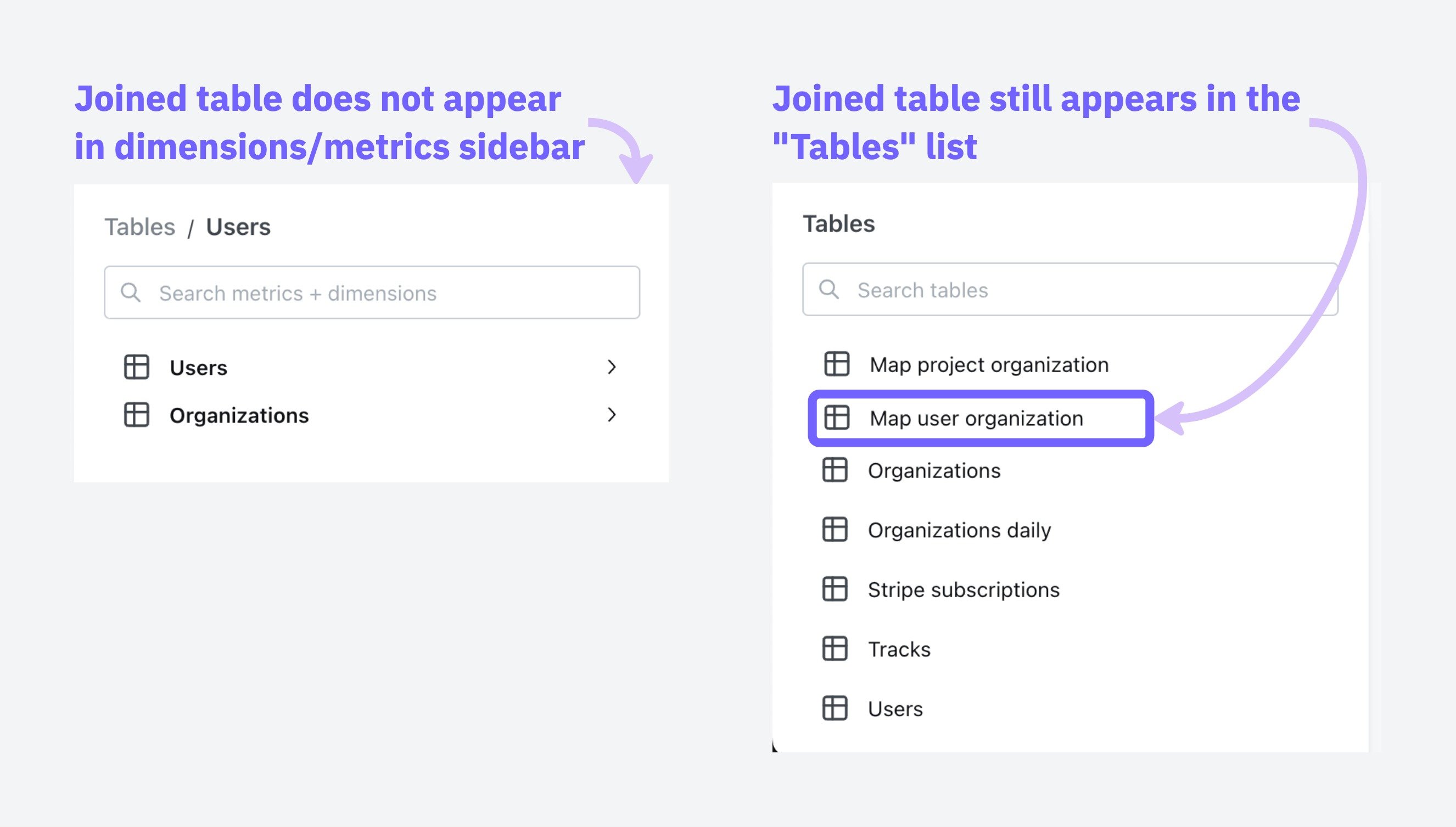 You can adjust which tables show up in the Tables list by adjusting your tables configuration under project settings, [read the guide here](/get-started/develop-in-lightdash/adding-tables-to-lightdash#configuring-which-tables-appear-in-your-lightdash-project).
## SQL fanouts
When joining tables in SQL, it can accidentally inflate your metrics if those tables have one-to-many relationships. Understanding when this happens helps you know which metrics need special handling.
When dealing with joins that might cause metric inflation, certain types of calculations remain safe to use.
### Safe vs. risky metrics
These metrics stay accurate even when the data contains duplicates:
* **min and max:** `min(order_total)` and `max(order_total)` give you the same answer whether you have duplicates or not, because they're looking for the extreme values, not counting or adding things up. The maximum value in a set doesn't change just because that value appears multiple times.
* **`Aggregate functions with distinct:`** `count(distinct user_id)` ensures each user is counted only once, regardless of how many times they appear in the joined result.
These metrics can give you the wrong answers:
* `sum`, `count`, `avg` without using distinct
* Custom calculations that treat duplicated rows as separate data points
### Common scenarios and what gets affected
**Example:** When you join an `organization` table to a `users` table, each organization can have multiple users.
In this scenario:
✅ **User metrics remain accurate** Since each user appears exactly once in the joined result, any metrics calculated on the user level (like average user age or total user count) will be correct.
❌ **Organization metrics become inflated** - Each organization will appear multiple times in the result set (once for each associated user). This means organization-level metrics will be counted multiple times, leading to inflated results.
For example, if "ABC Corp" has 2 users, its org\_total\_users metric cannot be summed because it will be duplicated twice.
**Raw tables**
`organizations` table
| organization\_id | organization\_name | org\_total\_users |
| :--------------- | :----------------- | :---------------- |
| 1 | ABC Corp | 2 |
| 2 | XYZ Ltd | 3 |
`users` table
| organization\_id | user\_id | user\_age |
| :--------------- | :------- | :-------- |
| 1 | 100 | 57 |
| 1 | 200 | 13 |
| 2 | 300 | 20 |
| 2 | 400 | 30 |
| 2 | 500 | 19 |
**Joined Output**
Organizations are multiplied by the number of users
| user\_id | organization\_id | org\_total\_users | user\_age |
| :------- | :--------------- | :---------------- | :-------- |
| 100 | 1 | 2 | 57 |
| 200 | 1 | 2 | 13 |
| 300 | 2 | 3 | 20 |
| 400 | 2 | 3 | 30 |
| 500 | 2 | 3 | 19 |
We cannot sum org\_total\_users on this joined table because it will be incorrect.
**Example:** When you create a chain of one-to-many relationships by joining `users` to their `orders`, and then `orders` to their support `tickets`.
In this scenario:
✅ **Ticket metrics remain accurate** - The final table (`tickets`) in the chain will have accurate metrics because each ticket appears exactly once in the result set.
❌ **Upstream tables experience compounding inflation** - The further up the chain you go, the worse the inflation gets:
* **Order metrics become inflated** by the number of tickets per order. If Order #1001 has 3 support tickets, any metrics for this order (like order value) will be counted 3 times.
* **User metrics suffer even more inflation** as they're multiplied by the total number of tickets. If a user has 2 orders with 3 tickets each, user-level metrics (like lifetime value) will be counted 6 times in aggregate calculations.
For example, if the user Alice has 2 orders and each of these orders have 3 tickets, after joining `users` → `orders` → `tickets`, the result would look like:
**Raw tables**
`users` table
| user\_id | user\_name | user\_age |
| :------- | :--------- | :-------- |
| 1 | Alice | 23 |
`orders` table
| order\_id | user\_id | order\_total\_items |
| :-------- | :------- | :------------------ |
| 1001 | 1 | 5 |
| 2001 | 1 | 2 |
`tickets` Table
| order\_id | ticket\_id | ticket\_time\_to\_first\_response\_mins |
| :-------- | :--------- | :-------------------------------------- |
| 1001 | A | 8 |
| 1001 | B | 62 |
| 1001 | C | 47 |
| 2001 | D | 5 |
| 2001 | E | 1 |
| 2001 | F | 89 |
**Joined output**
Step 1: First Join users to orders
| user\_name | user\_age | order\_id | order\_total\_items |
| :--------- | :-------- | :-------- | :------------------ |
| Alice | 23 | 1001 | 5 |
| Alice | 23 | 2001 | 2 |
Step 2: Join the result of step 1 to tickets
| user\_name | order\_id | ticket\_id | user\_age | order\_total\_items | ticket\_time\_to\_first\_response\_mins |
| :--------- | :-------- | :--------- | :-------- | :------------------ | :-------------------------------------- |
| Alice | 1001 | A | 23 | 5 | 8 |
| Alice | 1001 | B | 23 | 5 | 62 |
| Alice | 1001 | C | 23 | 5 | 47 |
| Alice | 2001 | D | 23 | 2 | 5 |
| Alice | 2001 | E | 23 | 2 | 1 |
| Alice | 2001 | F | 23 | 2 | 89 |
Note that `users` and `orders` are duplicated but `tickets` are not, which means we can only safely apply aggregates to metrics on the `tickets` table.
**Example:** When you join `users` → `orders` AND `users` → `tickets` (both `orders` and `tickets` relate to `users`, but not directly to each other)
This creates the most problematic data situation, when you join multiple one-to-many relationships that branch from the same table but aren't directly related to each other.
In this scenario:
❌ **EVERY aggregate metric gets inflated due to the cartesian product effect**
* **User metrics become massively inflated** by the product of `orders` × `tickets`. If a user has 5 orders and 10 support tickets, each user-level metric will be counted 50 times!
* **Order metrics get inflated** by the number of tickets the user has.
* **Ticket metrics get inflated** by the number of orders the user has.
For example, if the user Alice has 2 orders and 3 tickets, after joining `users` to both `orders` and `tickets` separately, the result would look like:
**Raw tables**
`users` table
| user\_id | user\_name | user\_credit\_amount |
| :------- | :--------- | :------------------- |
| 1 | Alice | 100 |
`orders` table
| user\_id | order\_id | order\_total\_items |
| :------- | :-------- | :------------------ |
| 1 | 1001 | 5 |
| 1 | 2001 | 2 |
`tickets` Table
| user\_id | ticket\_id | ticket\_time\_to\_first\_response\_mins |
| :------- | :--------- | :-------------------------------------- |
| 1 | A | 8 |
| 1 | B | 62 |
| 1 | C | 47 |
**The cartesian product** - (every record is joined to every other record) of users, orders and tickets.
| user\_name | order\_id | ticket\_id | user\_credit\_amount | order\_total\_items | ticket\_time\_to\_first\_response\_mins |
| :--------- | :-------- | :--------- | :------------------- | :------------------ | :-------------------------------------- |
| Alice | 1001 | A | 100 | 5 | 8 |
| Alice | 1001 | B | 100 | 5 | 62 |
| Alice | 1001 | C | 100 | 5 | 47 |
| Alice | 2001 | A | 100 | 2 | 8 |
| Alice | 2001 | B | 100 | 2 | 62 |
| Alice | 2001 | C | 100 | 2 | 47 |
Note that there is duplication in `users`, `orders` and `tickets` records. We cannot apply aggregates on any metrics without deduplicating records.
This creates the worst-case scenario where no aggregate metric (`sum`, `count`, `avg`) is safe without explicit deduplication techniques.
### Handling fanouts
Lightdash can automatically handle deduplicating metrics that are inflated due to fanouts if join relationships are specified in YAML as described [in Defining join relationships, above](#defining-join-relationships).
**For example:**
```yaml theme={null}
models:
- name: users
meta:
primary_key: user_id
joins:
- join: organizations
sql_on: ${organizations.organization_id} = ${users.organization_id}
relationship: many-to-one
- join: orders
sql_on: ${users.user_id} = ${orders.user_id}
relationship: one-to-many
```
```yaml theme={null}
models:
- name: users
config:
meta:
primary_key: user_id
joins:
- join: organizations
sql_on: ${organizations.organization_id} = ${users.organization_id}
relationship: many-to-one
- join: orders
sql_on: ${users.user_id} = ${orders.user_id}
relationship: one-to-many
```
```yaml theme={null}
type: model
name: users
primary_key: user_id
joins:
- join: organizations
sql_on: ${organizations.organization_id} = ${users.organization_id}
relationship: many-to-one
- join: orders
sql_on: ${users.user_id} = ${orders.user_id}
relationship: one-to-many
```
Specifying a `primary_key` and the join `relationship` allows Lightdash to:
* Understand the **intended row-level granularity**
* Prevent metric inflation by deduplicating joined rows
Once you've included primary keys and a join relationship, Lightdash will add CTEs to the compiled SQL query that ensure metrics are not inflated.
#### How Lightdash solves SQL fanouts
Lightdash uses a pattern of Common Table Expressions (CTEs) to solve the fanout problem. Here's how it works:
1. **cte\_keys**: Contains dimensions (like payment\_method, order\_id) that define the grain of your final results and the primary keys. Any field you want to GROUP BY in your final output should be included here.
2. **cte\_metrics**: Performs calculations on metrics while maintaining the correct grain established by the keys CTE. This prevents double-counting when aggregating across related tables.
3. **cte\_unaffected**: Calculates all metrics that are not affected by fanouts. This includes metrics that exclude duplicates by definition (i.e. `MIN()`, `MAX()` and `COUNT(DISTINCT)`) as well as metrics that are calculated on the table that is on the `many` side of an `one-to-many` or `many-to-one` join relationship. For example, if you have joined `accounts` to `deals` using a `one-to-many` join relationship, `SUM(deals.amount)` would be calculated in this unaffected\_cte because the `deals` data is not susceptible to fanouts.
4. **final**: Join the metrics CTEs together to create the complete result set.
Lightdash creates a separate cte\_keys and cte\_metrics for each table that contains metrics with fanouts. This is why you'll see names like "cte\_keys\_orders" and "cte\_metrics\_orders" in the example below, indicating they're specific to the orders table.
##### Examples
```sql theme={null}
# Step 1: Create cte_keys that determine the final grain of your results i.e. whatever we will group by.
# Exclude fields that we use in aggregations to calculate metrics e.g. `"orders".amount`
WITH cte_keys_orders AS (
SELECT DISTINCT
"orders".status AS "orders_status", -- grouping dimension
"orders".order_id AS "pk_order_id" -- primary key
FROM "postgres"."jaffle"."payments" AS "payments"
LEFT OUTER JOIN "postgres"."jaffle"."orders" AS "orders"
ON ("orders".order_id) = ("payments".order_id)
),
# Step 2: Calculate metrics that are affected by fanouts
cte_metrics_orders AS (
SELECT
cte_keys_orders."orders_status",
SUM("orders".amount) AS "orders_total_order_amount" -- order metric (affected by fanout)
FROM cte_keys_orders
LEFT JOIN "postgres"."jaffle"."orders" AS "orders" ON cte_keys_orders."pk_order_id" = "orders".order_id -- join with primary keys
GROUP BY 1 -- Note orders_status are grouping dimensions
),
# Step 3: Calculate metrics that are not affected by fanouts
cte_unaffected AS (
SELECT
"orders".status AS "orders_status",
COUNT(DISTINCT "payments".payment_id) AS "payments_unique_payment_count" -- payment metric (NOT affected by fanout)
FROM "postgres"."jaffle"."payments" AS "payments"
LEFT OUTER JOIN "postgres"."jaffle"."orders" AS "orders"
ON ("orders".order_id) = ("payments".order_id)
GROUP BY 1 -- Note orders_status are grouping dimensions
)
# Step 4: Join the metrics CTEs together to create the final result with properly calculated metrics
SELECT
cte_unaffected.*,
cte_metrics_orders."orders_total_order_amount" AS "orders_total_order_amount"
FROM cte_unaffected
INNER JOIN cte_metrics_orders ON (
cte_unaffected."orders_status" = cte_metrics_orders."orders_status" OR ( cte_unaffected."orders_status" IS NULL AND cte_metrics_orders."orders_status" IS NULL )
)
ORDER BY "orders_total_order_amount" DESC
LIMIT 500
```
### Known limitations
There are a few situations where Lightdash doesn't currently handle inflated metrics:
When a metric in one table references a dimension from a joined table, Lightdash's fanout handling may not correctly deduplicate the results.
**Example**
References in metric `sql`
```yaml theme={null}
metrics:
total_amount:
type: sum
sql: ${amount}+${expenses.amount}
```
**Recommendation**
To avoid this limitation, consider moving this logic to your dbt models. By transforming your data in dbt first, you can pre-calculate these dimensions without needing to reference dimensions from joined tables in Lightdash.
Metrics that include filters based on dimensions from joined tables can also cause issues with Lightdash's fanout handling.
**Example**
```yaml theme={null}
metrics:
count_users:
type: count_distinct
filters:
- web_sessions.is_bot_user: false
```
**Recommendation**
To avoid this limitation, consider moving this logic to your dbt models. By applying these filters in your dbt transformations, you can create pre-filtered metrics that don't require referencing dimensions from joined tables in Lightdash.
Metrics that involve multiple levels of references or dependencies can be particularly challenging for Lightdash's fanout handling.
**Example**
```yaml theme={null}
# orders.yml
metrics:
total_amount:
type: number
sql: ${amount}+${expenses.total_amount}
# expenses.yml
metrics:
total_amount:
type: number
sql: ${amount}+${tariffs.amount}
```
**Recommendation**
To avoid this limitation, consider moving this complex logic to your dbt models. By pre-calculating these metrics in dbt, you can flatten the dependency chain and avoid the need for multi-level references between joined tables in Lightdash.
Rolledup metrics are pre-aggregated metrics that have already been calculated at a specific granularity in your data warehouse. When these metrics are used in queries that involve joins creating fanouts, they can become inflated because the pre-aggregated values get duplicated across the fanned-out rows.
**Example: Orders and payments analysis**
Consider a scenario where you have an orders table with total\_amount and a payments table with payment methods. For each order, you can have multiple payments with different methods:
**orders table:**
| order\_id | total\_amount |
| :-------- | :------------ |
| 1001 | 100.00 |
| 1002 | 250.00 |
**payments table:**
| payment\_id | order\_id | payment\_method | amount |
| :---------- | :-------- | :-------------- | :----- |
| 1 | 1001 | cash | 60.00 |
| 2 | 1001 | card | 40.00 |
| 3 | 1002 | card | 250.00 |
If you select payment method and average orders total\_amount, the results are wrong because total\_amount is a rolledup metric that can't be split by method:
| payment\_method | avg\_order\_total |
| :-------------- | :---------------- |
| cash | 100.00 |
| card | 175.00 |
This is incorrect because:
* The cash average should reflect that cash was only used for part of order 1001 (\$100), but the query shows \$100 as if cash paid for the entire order
* The card average shows \$175 (average of \$100 and \$250), but this doesn't represent the actual relationship between card payments and order totals
The issue is that `total_amount` is a rolledup metric at the order level, but when joined with payments, it gets duplicated across payment methods, making it impossible to correctly analyze the relationship between payment methods and order totals.
**Best practices for rolledup metrics**
To avoid issues with rolledup metrics in joins that create fanouts:
* **Avoid rolledup metrics when possible:** Instead of using pre-aggregated values, use the underlying detail-level data. For example, instead of using a pre-calculated `total_amount` at the order level, use individual payment amounts that can be properly aggregated.
* **Name rolledup metrics clearly:** If you must use rolledup metrics, give them descriptive names that indicate their pre-aggregated nature and limitations.
* **Provide clear descriptions:** Always include detailed descriptions in your dbt model's YAML that explain the metric's granularity and any limitations when used with joins.
```yaml theme={null}
models:
- name: orders
columns:
- name: total_amount
meta:
metrics:
total_order_amount:
type: sum
description: 'Pre-aggregated total amount per order. Cannot be meaningfully split by payment method or other transaction-level dimensions.'
```
```yaml theme={null}
models:
- name: orders
columns:
- name: total_amount
config:
meta:
metrics:
total_order_amount:
type: sum
description: 'Pre-aggregated total amount per order. Cannot be meaningfully split by payment method or other transaction-level dimensions.'
```
```yaml theme={null}
type: model
name: orders
dimensions:
- name: total_amount
metrics:
total_order_amount:
type: sum
sql: ${TABLE}.total_amount
description: 'Pre-aggregated total amount per order. Cannot be meaningfully split by payment method or other transaction-level dimensions.'
```
In some business scenarios, fanouts are actually desired and represent real data relationships. A common example is when you need to calculate per-user fees or charges.
**Example: Per-user billing**
Consider a scenario with accounts, users, and per-user fees where different accounts pay different rates:
**accounts table:**
| account\_id | account\_name |
| :---------- | :------------ |
| 1 | TechCorp |
| 2 | StartupXYZ |
**users table:**
| user\_id | account\_id | user\_name |
| :------- | :---------- | :--------- |
| 101 | 1 | Alice |
| 102 | 1 | Bob |
| 201 | 2 | David |
**fees table:**
| account\_id | fee\_type | per\_user\_amount |
| :---------- | :----------- | :---------------- |
| 1 | Support Fee | 80.00 |
| 1 | Training Fee | 120.00 |
| 2 | Support Fee | 50.00 |
| 2 | Training Fee | 75.00 |
When you join these tables:
```sql theme={null}
SELECT
a.account_name,
u.user_name,
f.fee_type,
f.per_user_amount
FROM
accounts a
LEFT JOIN users u ON a.account_id = u.account_id
LEFT JOIN fees f ON a.account_id = f.account_id;
```
The resulting fanout is exactly what you want for billing:
| account\_name | user\_name | fee\_type | per\_user\_amount |
| :------------ | :--------- | :----------- | :---------------- |
| TechCorp | Alice | Support Fee | 80.00 |
| TechCorp | Alice | Training Fee | 120.00 |
| TechCorp | Bob | Support Fee | 80.00 |
| TechCorp | Bob | Training Fee | 120.00 |
| StartupXYZ | David | Support Fee | 50.00 |
| StartupXYZ | David | Training Fee | 75.00 |
In this case, each row represents a real charge, and the total billing (TechCorp pays \$400, StartupXYZ pays \$125) is correctly calculated by summing all rows.
**Handling intentional fanouts**
Lightdash does not currently provide a built-in way to explicitly handle intentional fanouts. Using intentional fanouts can cause issues when defining other table relationships and may conflict with Lightdash's automatic fanout handling.
We recommend always use fanout protection for joins. When you actually want a fanout (like per-user billing), create a dedicated dbt model that handles the logic and gets your data to the right granularity first. Then use that model in Lightdash.
You can adjust which tables show up in the Tables list by adjusting your tables configuration under project settings, [read the guide here](/get-started/develop-in-lightdash/adding-tables-to-lightdash#configuring-which-tables-appear-in-your-lightdash-project).
## SQL fanouts
When joining tables in SQL, it can accidentally inflate your metrics if those tables have one-to-many relationships. Understanding when this happens helps you know which metrics need special handling.
When dealing with joins that might cause metric inflation, certain types of calculations remain safe to use.
### Safe vs. risky metrics
These metrics stay accurate even when the data contains duplicates:
* **min and max:** `min(order_total)` and `max(order_total)` give you the same answer whether you have duplicates or not, because they're looking for the extreme values, not counting or adding things up. The maximum value in a set doesn't change just because that value appears multiple times.
* **`Aggregate functions with distinct:`** `count(distinct user_id)` ensures each user is counted only once, regardless of how many times they appear in the joined result.
These metrics can give you the wrong answers:
* `sum`, `count`, `avg` without using distinct
* Custom calculations that treat duplicated rows as separate data points
### Common scenarios and what gets affected
**Example:** When you join an `organization` table to a `users` table, each organization can have multiple users.
In this scenario:
✅ **User metrics remain accurate** Since each user appears exactly once in the joined result, any metrics calculated on the user level (like average user age or total user count) will be correct.
❌ **Organization metrics become inflated** - Each organization will appear multiple times in the result set (once for each associated user). This means organization-level metrics will be counted multiple times, leading to inflated results.
For example, if "ABC Corp" has 2 users, its org\_total\_users metric cannot be summed because it will be duplicated twice.
**Raw tables**
`organizations` table
| organization\_id | organization\_name | org\_total\_users |
| :--------------- | :----------------- | :---------------- |
| 1 | ABC Corp | 2 |
| 2 | XYZ Ltd | 3 |
`users` table
| organization\_id | user\_id | user\_age |
| :--------------- | :------- | :-------- |
| 1 | 100 | 57 |
| 1 | 200 | 13 |
| 2 | 300 | 20 |
| 2 | 400 | 30 |
| 2 | 500 | 19 |
**Joined Output**
Organizations are multiplied by the number of users
| user\_id | organization\_id | org\_total\_users | user\_age |
| :------- | :--------------- | :---------------- | :-------- |
| 100 | 1 | 2 | 57 |
| 200 | 1 | 2 | 13 |
| 300 | 2 | 3 | 20 |
| 400 | 2 | 3 | 30 |
| 500 | 2 | 3 | 19 |
We cannot sum org\_total\_users on this joined table because it will be incorrect.
**Example:** When you create a chain of one-to-many relationships by joining `users` to their `orders`, and then `orders` to their support `tickets`.
In this scenario:
✅ **Ticket metrics remain accurate** - The final table (`tickets`) in the chain will have accurate metrics because each ticket appears exactly once in the result set.
❌ **Upstream tables experience compounding inflation** - The further up the chain you go, the worse the inflation gets:
* **Order metrics become inflated** by the number of tickets per order. If Order #1001 has 3 support tickets, any metrics for this order (like order value) will be counted 3 times.
* **User metrics suffer even more inflation** as they're multiplied by the total number of tickets. If a user has 2 orders with 3 tickets each, user-level metrics (like lifetime value) will be counted 6 times in aggregate calculations.
For example, if the user Alice has 2 orders and each of these orders have 3 tickets, after joining `users` → `orders` → `tickets`, the result would look like:
**Raw tables**
`users` table
| user\_id | user\_name | user\_age |
| :------- | :--------- | :-------- |
| 1 | Alice | 23 |
`orders` table
| order\_id | user\_id | order\_total\_items |
| :-------- | :------- | :------------------ |
| 1001 | 1 | 5 |
| 2001 | 1 | 2 |
`tickets` Table
| order\_id | ticket\_id | ticket\_time\_to\_first\_response\_mins |
| :-------- | :--------- | :-------------------------------------- |
| 1001 | A | 8 |
| 1001 | B | 62 |
| 1001 | C | 47 |
| 2001 | D | 5 |
| 2001 | E | 1 |
| 2001 | F | 89 |
**Joined output**
Step 1: First Join users to orders
| user\_name | user\_age | order\_id | order\_total\_items |
| :--------- | :-------- | :-------- | :------------------ |
| Alice | 23 | 1001 | 5 |
| Alice | 23 | 2001 | 2 |
Step 2: Join the result of step 1 to tickets
| user\_name | order\_id | ticket\_id | user\_age | order\_total\_items | ticket\_time\_to\_first\_response\_mins |
| :--------- | :-------- | :--------- | :-------- | :------------------ | :-------------------------------------- |
| Alice | 1001 | A | 23 | 5 | 8 |
| Alice | 1001 | B | 23 | 5 | 62 |
| Alice | 1001 | C | 23 | 5 | 47 |
| Alice | 2001 | D | 23 | 2 | 5 |
| Alice | 2001 | E | 23 | 2 | 1 |
| Alice | 2001 | F | 23 | 2 | 89 |
Note that `users` and `orders` are duplicated but `tickets` are not, which means we can only safely apply aggregates to metrics on the `tickets` table.
**Example:** When you join `users` → `orders` AND `users` → `tickets` (both `orders` and `tickets` relate to `users`, but not directly to each other)
This creates the most problematic data situation, when you join multiple one-to-many relationships that branch from the same table but aren't directly related to each other.
In this scenario:
❌ **EVERY aggregate metric gets inflated due to the cartesian product effect**
* **User metrics become massively inflated** by the product of `orders` × `tickets`. If a user has 5 orders and 10 support tickets, each user-level metric will be counted 50 times!
* **Order metrics get inflated** by the number of tickets the user has.
* **Ticket metrics get inflated** by the number of orders the user has.
For example, if the user Alice has 2 orders and 3 tickets, after joining `users` to both `orders` and `tickets` separately, the result would look like:
**Raw tables**
`users` table
| user\_id | user\_name | user\_credit\_amount |
| :------- | :--------- | :------------------- |
| 1 | Alice | 100 |
`orders` table
| user\_id | order\_id | order\_total\_items |
| :------- | :-------- | :------------------ |
| 1 | 1001 | 5 |
| 1 | 2001 | 2 |
`tickets` Table
| user\_id | ticket\_id | ticket\_time\_to\_first\_response\_mins |
| :------- | :--------- | :-------------------------------------- |
| 1 | A | 8 |
| 1 | B | 62 |
| 1 | C | 47 |
**The cartesian product** - (every record is joined to every other record) of users, orders and tickets.
| user\_name | order\_id | ticket\_id | user\_credit\_amount | order\_total\_items | ticket\_time\_to\_first\_response\_mins |
| :--------- | :-------- | :--------- | :------------------- | :------------------ | :-------------------------------------- |
| Alice | 1001 | A | 100 | 5 | 8 |
| Alice | 1001 | B | 100 | 5 | 62 |
| Alice | 1001 | C | 100 | 5 | 47 |
| Alice | 2001 | A | 100 | 2 | 8 |
| Alice | 2001 | B | 100 | 2 | 62 |
| Alice | 2001 | C | 100 | 2 | 47 |
Note that there is duplication in `users`, `orders` and `tickets` records. We cannot apply aggregates on any metrics without deduplicating records.
This creates the worst-case scenario where no aggregate metric (`sum`, `count`, `avg`) is safe without explicit deduplication techniques.
### Handling fanouts
Lightdash can automatically handle deduplicating metrics that are inflated due to fanouts if join relationships are specified in YAML as described [in Defining join relationships, above](#defining-join-relationships).
**For example:**
```yaml theme={null}
models:
- name: users
meta:
primary_key: user_id
joins:
- join: organizations
sql_on: ${organizations.organization_id} = ${users.organization_id}
relationship: many-to-one
- join: orders
sql_on: ${users.user_id} = ${orders.user_id}
relationship: one-to-many
```
```yaml theme={null}
models:
- name: users
config:
meta:
primary_key: user_id
joins:
- join: organizations
sql_on: ${organizations.organization_id} = ${users.organization_id}
relationship: many-to-one
- join: orders
sql_on: ${users.user_id} = ${orders.user_id}
relationship: one-to-many
```
```yaml theme={null}
type: model
name: users
primary_key: user_id
joins:
- join: organizations
sql_on: ${organizations.organization_id} = ${users.organization_id}
relationship: many-to-one
- join: orders
sql_on: ${users.user_id} = ${orders.user_id}
relationship: one-to-many
```
Specifying a `primary_key` and the join `relationship` allows Lightdash to:
* Understand the **intended row-level granularity**
* Prevent metric inflation by deduplicating joined rows
Once you've included primary keys and a join relationship, Lightdash will add CTEs to the compiled SQL query that ensure metrics are not inflated.
#### How Lightdash solves SQL fanouts
Lightdash uses a pattern of Common Table Expressions (CTEs) to solve the fanout problem. Here's how it works:
1. **cte\_keys**: Contains dimensions (like payment\_method, order\_id) that define the grain of your final results and the primary keys. Any field you want to GROUP BY in your final output should be included here.
2. **cte\_metrics**: Performs calculations on metrics while maintaining the correct grain established by the keys CTE. This prevents double-counting when aggregating across related tables.
3. **cte\_unaffected**: Calculates all metrics that are not affected by fanouts. This includes metrics that exclude duplicates by definition (i.e. `MIN()`, `MAX()` and `COUNT(DISTINCT)`) as well as metrics that are calculated on the table that is on the `many` side of an `one-to-many` or `many-to-one` join relationship. For example, if you have joined `accounts` to `deals` using a `one-to-many` join relationship, `SUM(deals.amount)` would be calculated in this unaffected\_cte because the `deals` data is not susceptible to fanouts.
4. **final**: Join the metrics CTEs together to create the complete result set.
Lightdash creates a separate cte\_keys and cte\_metrics for each table that contains metrics with fanouts. This is why you'll see names like "cte\_keys\_orders" and "cte\_metrics\_orders" in the example below, indicating they're specific to the orders table.
##### Examples
```sql theme={null}
# Step 1: Create cte_keys that determine the final grain of your results i.e. whatever we will group by.
# Exclude fields that we use in aggregations to calculate metrics e.g. `"orders".amount`
WITH cte_keys_orders AS (
SELECT DISTINCT
"orders".status AS "orders_status", -- grouping dimension
"orders".order_id AS "pk_order_id" -- primary key
FROM "postgres"."jaffle"."payments" AS "payments"
LEFT OUTER JOIN "postgres"."jaffle"."orders" AS "orders"
ON ("orders".order_id) = ("payments".order_id)
),
# Step 2: Calculate metrics that are affected by fanouts
cte_metrics_orders AS (
SELECT
cte_keys_orders."orders_status",
SUM("orders".amount) AS "orders_total_order_amount" -- order metric (affected by fanout)
FROM cte_keys_orders
LEFT JOIN "postgres"."jaffle"."orders" AS "orders" ON cte_keys_orders."pk_order_id" = "orders".order_id -- join with primary keys
GROUP BY 1 -- Note orders_status are grouping dimensions
),
# Step 3: Calculate metrics that are not affected by fanouts
cte_unaffected AS (
SELECT
"orders".status AS "orders_status",
COUNT(DISTINCT "payments".payment_id) AS "payments_unique_payment_count" -- payment metric (NOT affected by fanout)
FROM "postgres"."jaffle"."payments" AS "payments"
LEFT OUTER JOIN "postgres"."jaffle"."orders" AS "orders"
ON ("orders".order_id) = ("payments".order_id)
GROUP BY 1 -- Note orders_status are grouping dimensions
)
# Step 4: Join the metrics CTEs together to create the final result with properly calculated metrics
SELECT
cte_unaffected.*,
cte_metrics_orders."orders_total_order_amount" AS "orders_total_order_amount"
FROM cte_unaffected
INNER JOIN cte_metrics_orders ON (
cte_unaffected."orders_status" = cte_metrics_orders."orders_status" OR ( cte_unaffected."orders_status" IS NULL AND cte_metrics_orders."orders_status" IS NULL )
)
ORDER BY "orders_total_order_amount" DESC
LIMIT 500
```
### Known limitations
There are a few situations where Lightdash doesn't currently handle inflated metrics:
When a metric in one table references a dimension from a joined table, Lightdash's fanout handling may not correctly deduplicate the results.
**Example**
References in metric `sql`
```yaml theme={null}
metrics:
total_amount:
type: sum
sql: ${amount}+${expenses.amount}
```
**Recommendation**
To avoid this limitation, consider moving this logic to your dbt models. By transforming your data in dbt first, you can pre-calculate these dimensions without needing to reference dimensions from joined tables in Lightdash.
Metrics that include filters based on dimensions from joined tables can also cause issues with Lightdash's fanout handling.
**Example**
```yaml theme={null}
metrics:
count_users:
type: count_distinct
filters:
- web_sessions.is_bot_user: false
```
**Recommendation**
To avoid this limitation, consider moving this logic to your dbt models. By applying these filters in your dbt transformations, you can create pre-filtered metrics that don't require referencing dimensions from joined tables in Lightdash.
Metrics that involve multiple levels of references or dependencies can be particularly challenging for Lightdash's fanout handling.
**Example**
```yaml theme={null}
# orders.yml
metrics:
total_amount:
type: number
sql: ${amount}+${expenses.total_amount}
# expenses.yml
metrics:
total_amount:
type: number
sql: ${amount}+${tariffs.amount}
```
**Recommendation**
To avoid this limitation, consider moving this complex logic to your dbt models. By pre-calculating these metrics in dbt, you can flatten the dependency chain and avoid the need for multi-level references between joined tables in Lightdash.
Rolledup metrics are pre-aggregated metrics that have already been calculated at a specific granularity in your data warehouse. When these metrics are used in queries that involve joins creating fanouts, they can become inflated because the pre-aggregated values get duplicated across the fanned-out rows.
**Example: Orders and payments analysis**
Consider a scenario where you have an orders table with total\_amount and a payments table with payment methods. For each order, you can have multiple payments with different methods:
**orders table:**
| order\_id | total\_amount |
| :-------- | :------------ |
| 1001 | 100.00 |
| 1002 | 250.00 |
**payments table:**
| payment\_id | order\_id | payment\_method | amount |
| :---------- | :-------- | :-------------- | :----- |
| 1 | 1001 | cash | 60.00 |
| 2 | 1001 | card | 40.00 |
| 3 | 1002 | card | 250.00 |
If you select payment method and average orders total\_amount, the results are wrong because total\_amount is a rolledup metric that can't be split by method:
| payment\_method | avg\_order\_total |
| :-------------- | :---------------- |
| cash | 100.00 |
| card | 175.00 |
This is incorrect because:
* The cash average should reflect that cash was only used for part of order 1001 (\$100), but the query shows \$100 as if cash paid for the entire order
* The card average shows \$175 (average of \$100 and \$250), but this doesn't represent the actual relationship between card payments and order totals
The issue is that `total_amount` is a rolledup metric at the order level, but when joined with payments, it gets duplicated across payment methods, making it impossible to correctly analyze the relationship between payment methods and order totals.
**Best practices for rolledup metrics**
To avoid issues with rolledup metrics in joins that create fanouts:
* **Avoid rolledup metrics when possible:** Instead of using pre-aggregated values, use the underlying detail-level data. For example, instead of using a pre-calculated `total_amount` at the order level, use individual payment amounts that can be properly aggregated.
* **Name rolledup metrics clearly:** If you must use rolledup metrics, give them descriptive names that indicate their pre-aggregated nature and limitations.
* **Provide clear descriptions:** Always include detailed descriptions in your dbt model's YAML that explain the metric's granularity and any limitations when used with joins.
```yaml theme={null}
models:
- name: orders
columns:
- name: total_amount
meta:
metrics:
total_order_amount:
type: sum
description: 'Pre-aggregated total amount per order. Cannot be meaningfully split by payment method or other transaction-level dimensions.'
```
```yaml theme={null}
models:
- name: orders
columns:
- name: total_amount
config:
meta:
metrics:
total_order_amount:
type: sum
description: 'Pre-aggregated total amount per order. Cannot be meaningfully split by payment method or other transaction-level dimensions.'
```
```yaml theme={null}
type: model
name: orders
dimensions:
- name: total_amount
metrics:
total_order_amount:
type: sum
sql: ${TABLE}.total_amount
description: 'Pre-aggregated total amount per order. Cannot be meaningfully split by payment method or other transaction-level dimensions.'
```
In some business scenarios, fanouts are actually desired and represent real data relationships. A common example is when you need to calculate per-user fees or charges.
**Example: Per-user billing**
Consider a scenario with accounts, users, and per-user fees where different accounts pay different rates:
**accounts table:**
| account\_id | account\_name |
| :---------- | :------------ |
| 1 | TechCorp |
| 2 | StartupXYZ |
**users table:**
| user\_id | account\_id | user\_name |
| :------- | :---------- | :--------- |
| 101 | 1 | Alice |
| 102 | 1 | Bob |
| 201 | 2 | David |
**fees table:**
| account\_id | fee\_type | per\_user\_amount |
| :---------- | :----------- | :---------------- |
| 1 | Support Fee | 80.00 |
| 1 | Training Fee | 120.00 |
| 2 | Support Fee | 50.00 |
| 2 | Training Fee | 75.00 |
When you join these tables:
```sql theme={null}
SELECT
a.account_name,
u.user_name,
f.fee_type,
f.per_user_amount
FROM
accounts a
LEFT JOIN users u ON a.account_id = u.account_id
LEFT JOIN fees f ON a.account_id = f.account_id;
```
The resulting fanout is exactly what you want for billing:
| account\_name | user\_name | fee\_type | per\_user\_amount |
| :------------ | :--------- | :----------- | :---------------- |
| TechCorp | Alice | Support Fee | 80.00 |
| TechCorp | Alice | Training Fee | 120.00 |
| TechCorp | Bob | Support Fee | 80.00 |
| TechCorp | Bob | Training Fee | 120.00 |
| StartupXYZ | David | Support Fee | 50.00 |
| StartupXYZ | David | Training Fee | 75.00 |
In this case, each row represents a real charge, and the total billing (TechCorp pays \$400, StartupXYZ pays \$125) is correctly calculated by summing all rows.
**Handling intentional fanouts**
Lightdash does not currently provide a built-in way to explicitly handle intentional fanouts. Using intentional fanouts can cause issues when defining other table relationships and may conflict with Lightdash's automatic fanout handling.
We recommend always use fanout protection for joins. When you actually want a fanout (like per-user billing), create a dedicated dbt model that handles the logic and gets your data to the right granularity first. Then use that model in Lightdash.